
 Share
Share
 Print
Print
|
|
|
|
|


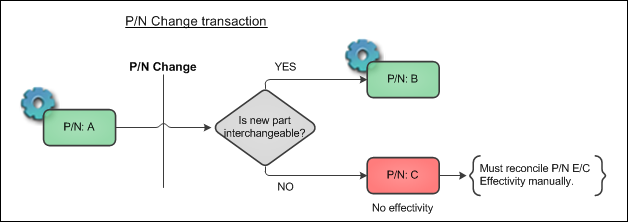
If the part is changed to a non-interchangeable P/N, the P/N E/C Effectivity will not transfer to the new part. A warning message prompt appears stating: 'Part Numbers are not interchangeable.You must reconcile the P/N control and E/C for P/N S/N manually.'
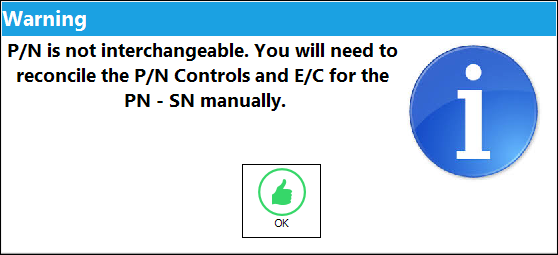
If the P/N is changed to a non-interchangeable part, the following soft warning message appears to inform the user that the effectivity will not be transfered to the non-interchangeable part.
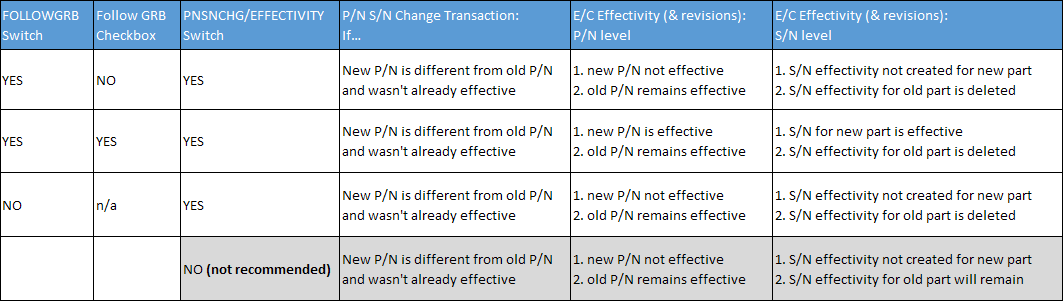
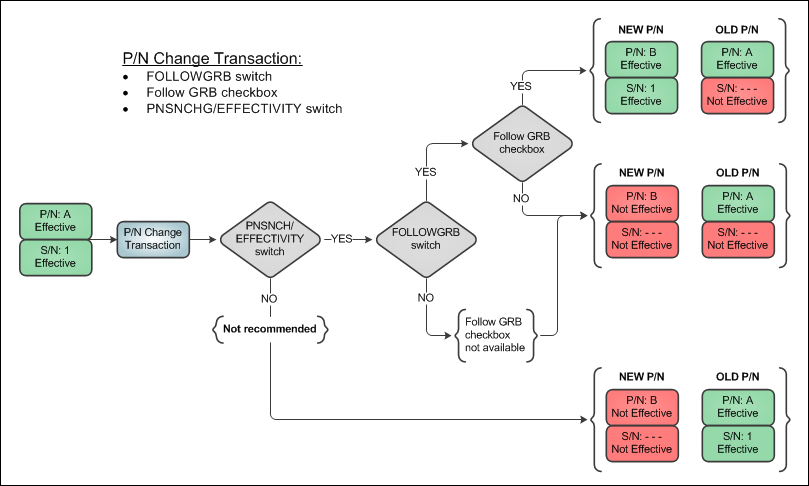
When performing P/N Change transactions, it is important to take into account the following configurations that will affect P/N E/C Effectivity. See table and flow chart below.
(works with Follow GRB checkbox)
When set to Yes, the Follow GRB checkbox will be available for selection via the E/C Category Transaction Code. Once selected via the Transaction Code, the Follow GRB checkbox will be available and selected by default on the Engineering Control P/N window. The system will continue to track the E/C for that GRB regardless of any changes made to any P/N S/N that is effective to the E/C including any Override schedules. This works for One Way Forward and Both Way Interchangeable P/Ns.
When set to No, the Follow GRB checkbox and the Load At Receiving checkbox will not be available on the Engineering Control P/N window. The system will not track the E/C for that GRB regardless of any changes made to any P/N S/N effective to that E/C.
(via P/N E/C window)(works with FOLLOWGRB switch)
When the Follow GRB checkbox is selected the system will continue to track the E/C for that GRB (Goods Received Batch) regardless of any changes made to any P/N S/N that is effective to the E/C including any Override schedules.
This checkbox functions accordingly for the following transactions:
- P/N S/N Change (Inventory Transaction)
- P/N S/N Change (Inventory Supervisor)
- P/N Receiving (Repair Orders only)
- Receiving Inspection
- P/N Modify To (via Engineering Control P/N window)
- P/N N/L/A Creation
When Engineering switch  FOLLOWGRB is set to Yes, this checkbox is available in the E/C Category transaction code. This means that all P/N E/Cs for a particular E/C Category can have the Follow GRB checkbox selected (or deselected) by default.
When set to Yes, an Inventory P/N S/N Change transaction will remove the effectivity and compliance history from the old P/N S/N and apply it to the new P/N S/N.
The following table and flow chart illustrate how the two switches and checkbox work in unison.
There is an audit table in Trax Quick Print called 'pn_sn_change_control_audit' that shows the before and after of the data that is updated via a P/N Change transactions. This information pertains to serialized parts. The data captured includes:
- Previous E/Cs linked to P/N S/N & Actuals
- Previous P/N Controls and Actuals
- New E/Cs being linked
- New P/N Controls being linked
- Transfer of Actuals
Share
Print
|
©1997-2026 Trax USA Corp. All rights reserved. This manual may not be copied, photocopied, reproduced, translated, or converted to any electronic or machine-readable form, in whole or in part, without prior written approval from Trax USA Corp. |
 |