 Download Online Help
 Print
|
|
|
|
|


Logging In to eMRO
From the user's device, enter the appropriate URL to log in to eMRO.
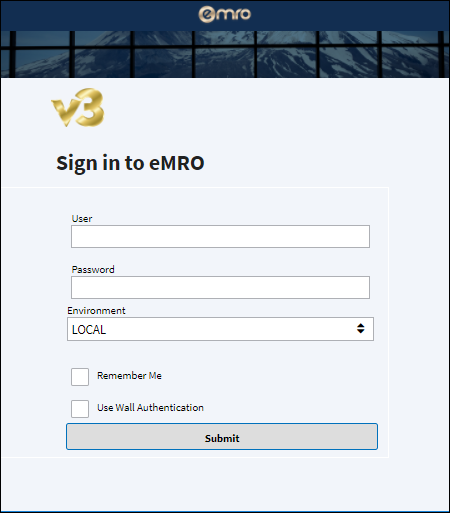
The following options/information is available in this window:
_________________________________________________________________________
User
Enter the pertinent username of the employee attempting to access the application. The username is created via the Security Explorer.
Password
The password linked to the above username. The Password is also linked to the username via the Security Explorer.
Environment
Select the name of the database to be logged into.
Remember Me checkbox
Select this checkbox to have your device save or remember your log in credentials.
Use Wall Authentication checkbox
Select this checkbox to enter eMRO with a unique Wall Password. When selected, the User profile is entered in the User field, but instead of the User's password, the Wall Password is entered. Once in, only the Wall user's security permissions are available. For more information refer to Applying Wall Passwords via the System Administration Training Manual.
Submit button
Click the Submit button to log in to the application.
_________________________________________________________________________
Download Online Help
Print
|
©1997-2018 Trax USA Corp. All rights reserved. This manual may not be copied, photocopied, reproduced, translated, or converted to any electronic or machine-readable form, in whole or in part, without prior written approval from Trax USA Corp. |
 |