 Download Online Help
 Print
|
|
|
|
|


Applying Wall Passwords
Wall Password security is assigned by system administrators to individual employees within single User profiles to track which specific employee is completing transactions and other duties. For example, a user group named 'LINEMX' could be used to combine several mechanics on the floor with one shared login username, but individual Wall passwords can be applied for each Employee record within that user profile.
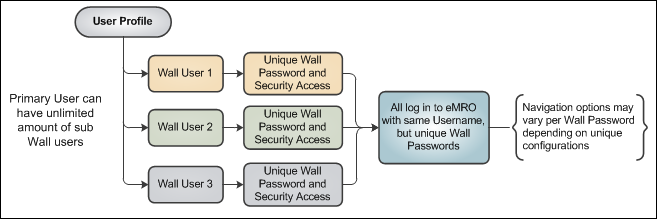
- Wall Configuration: Administrators can assign Wall Password security to their users through the Employee Wall Password System Add Button.
- Wall Login: Once configured, Wall users can log into eMRO by inputting the main User profile as the username with their own unique Wall Password. The Wall user will only have security access to the pre-configured windows. For more information on Wall password login refer to Wall Password Login.
For Wall-related examples refer to Additional Security Layers in eMRO.
Download Online Help
Print
|
©1997-2018 Trax USA Corp. All rights reserved. This manual may not be copied, photocopied, reproduced, translated, or converted to any electronic or machine-readable form, in whole or in part, without prior written approval from Trax USA Corp. |
 |