 Download Online Help
 Print
|
|
|
|
|


Pagination Feature
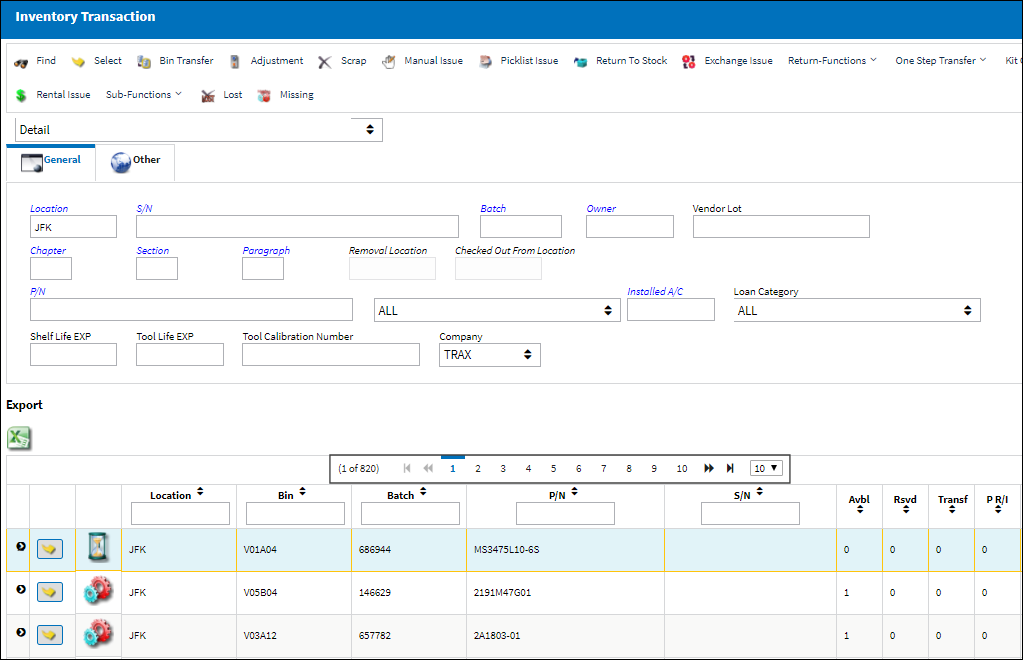
In window where numerous records have been returned, the pagination feature allows users to view a specified number of records per page. This allows the user to move from page to page, rather than scrolling through endless records to locate a specific record.
For example, In the Inventory Transaction window, the pagination feature is located at the bottom of the window (as it is located in every window in eMRO). The user can view additional part numbers by clicking the numbered pages  . The user can also click on the arrows to move forwards and backwards through the part number records.
Download Online Help
Print
|
©1997-2018 Trax USA Corp. All rights reserved. This manual may not be copied, photocopied, reproduced, translated, or converted to any electronic or machine-readable form, in whole or in part, without prior written approval from Trax USA Corp. |
 |