
 Share
Share
 Print
Print
|
|
|
|
|


A/C P/N Initial Load Multi, via A/C Initial P/N Load

The A/C P/N Initial Load Multi option is used to initially load multiple on-wing assembly parts directly onto an aircraft. This window works similarly to to P/N N/L/A Creation window as well as the A/C Initial P/N Multi Load windows. The main difference is that this option includes the ability to include the Installed Date, Shelf Life Expiration Date as well as the Tool Life Expiration Date. This information is relevant for on-wing parts that have NLA's.
Switch  ACPNINILOADMULTI must be set to Yes in order for this option to function correctly.
In the following example, the user is going to load an NHA part.
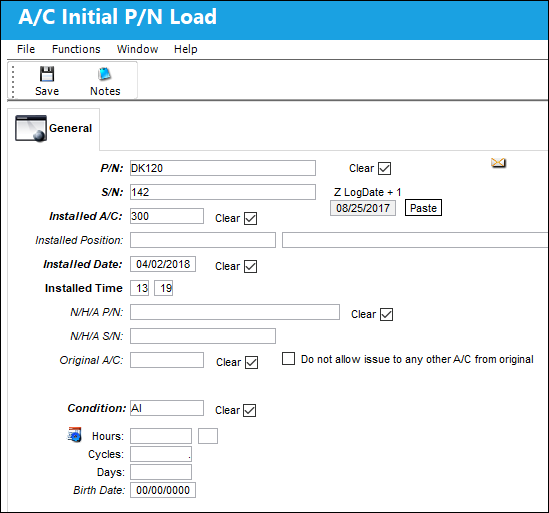
NLA Position will appear if a Next Higher Assembly (NHA) P/N and Serial Number (S/N) is entered.
Enter the Part Number and Serial Number of the item that the user wishes to load, along with the aircraft, installed date (and time if applicable).
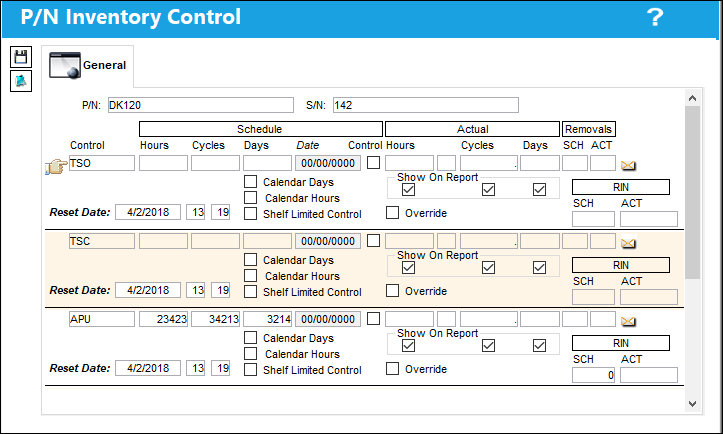
If the part itself or any of the assembly parts have Time Controls, the following screen will appear for each Serial Number. This will allow the user to enter current times of the parts.
The A/C P/N Initial Load Multi window is displayed. Much of the information from the A/C Initial P/N Load is cascaded down to the A/C P/N Initial Load Multi window. From here, the user may select the A/C P/N Initial Load Multi Import  button to import and load multiple assembly parts directly onto the respective aircraft.
For additional information regarding importing assembly parts via the A/C P/N Inital Load Multi window, refer to the A/C P/N Initial Load Multi Import button.
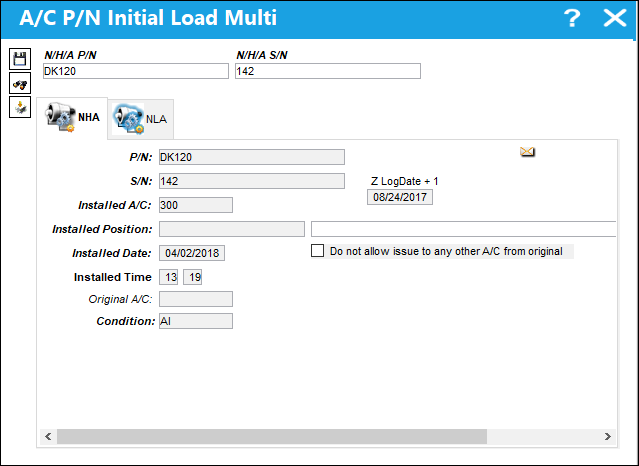
The following information/options are available in this window:
_____________________________________________________________________________________
N/H/A P/N
The part’s Next Higher Assembly P/N (if applicable).
N/H/A S/N
Next Higher Assembly (NHA) serial number.
P/N
The Part Number reference for the aircraft part.
S/N
The Serial Number for the specific serialized part.
Installed A/C
The aircraft in which the part is currently installed.
Z LogDate + 1
This is provided so that the user can automatically update the Installed Date field with the Z-Log Date + 1 (by clicking on the Paste button). The user can also enter any date manually.
Installed Position
The position on the aircraft of the installed part.
Installed Date
The Date that the part was Installed. The Z-Log Date + 1 is provided so that the user can automatically update the Installed Date field with the Z-Log Date + 1 (by clicking on the Paste button). The user can also enter any date manually. The user can enter an Installed Date that is less than the Z-Log Date. However, if the reset date of the P/N Control is less than the Z-Log Date, the reset date will be used.
Do not allow issue to any other A/C from original checkbox
Select this checkbox to disallow issue of part to an A/C other than the original A/C.
Installed Time
Time of part installation.
Original A/C
The original aircraft that the part was Installed on.
Condition
The condition of the part.
_____________________________________________________________________________________
Share
Print
|
©1997-2026 Trax USA Corp. All rights reserved. This manual may not be copied, photocopied, reproduced, translated, or converted to any electronic or machine-readable form, in whole or in part, without prior written approval from Trax USA Corp. |
 |