
 Share
Share
 Print
Print
|
|
|
|
|


Audit Requirement
The following format selections are available:
Report Format |
Description |
Audit Requirement Detail/Print |
Used for tracking Audits that are due. Shows all details from requirement including last accomplished date and next due date.
|
Audit Requirement Index |
Shows basic information regarding the Audit Requirement. |
 This print is security controlled via Security Explorer/ Quality Assurance/ Print/ Audit Requirement/ Audit Requirement Detail. For more information refer to the
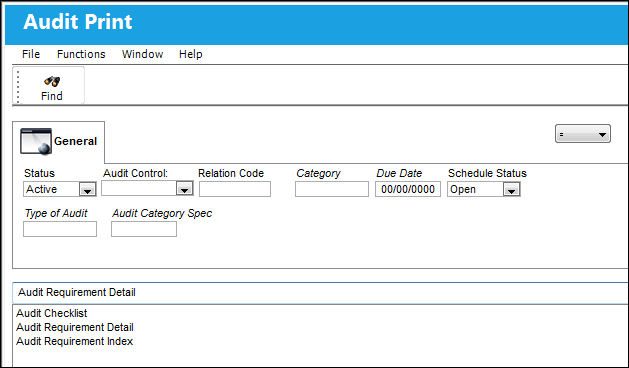
 The selection fields are as follows:
Field |
Description |
Status |
Can be Active, All or Inactive. Select Active to see all current Audit requirements. |
Audit Control |
Can be Vendor, Employee, Station or Internal. Choose which type of Audits you want to look at or leave blank for all. |
Relation Code |
Will change to suit the Audit Control selection. i.e. Vendor, Employee, Station or Internal (Department). |
Category |
Audit Control Category as per System Tran Code set-up |
Due Date |
Enter the required due date that you wish to view until or leave blank for all. |
Schedule Status |
Can be Open, Closed or All. Select Open with Active to see all current due Audits. |
Enter the selections desired. As with the majority of the query and print selections on the system, it is better to select as many parameters as required to minimize your search result. You can search for data based on criteria drawn from all fields on the window. Please use all drop lists available to confirm that the data collected for print is as specific as necessary. Select the Find  button to generate the report.
Share
Print
|
©1997-2026 Trax USA Corp. All rights reserved. This manual may not be copied, photocopied, reproduced, translated, or converted to any electronic or machine-readable form, in whole or in part, without prior written approval from Trax USA Corp. |
 |