
 Share
Share
 Print
Print
|
|
|
|
|


P/N Software Configuration (PNSOFTEC - Yes)

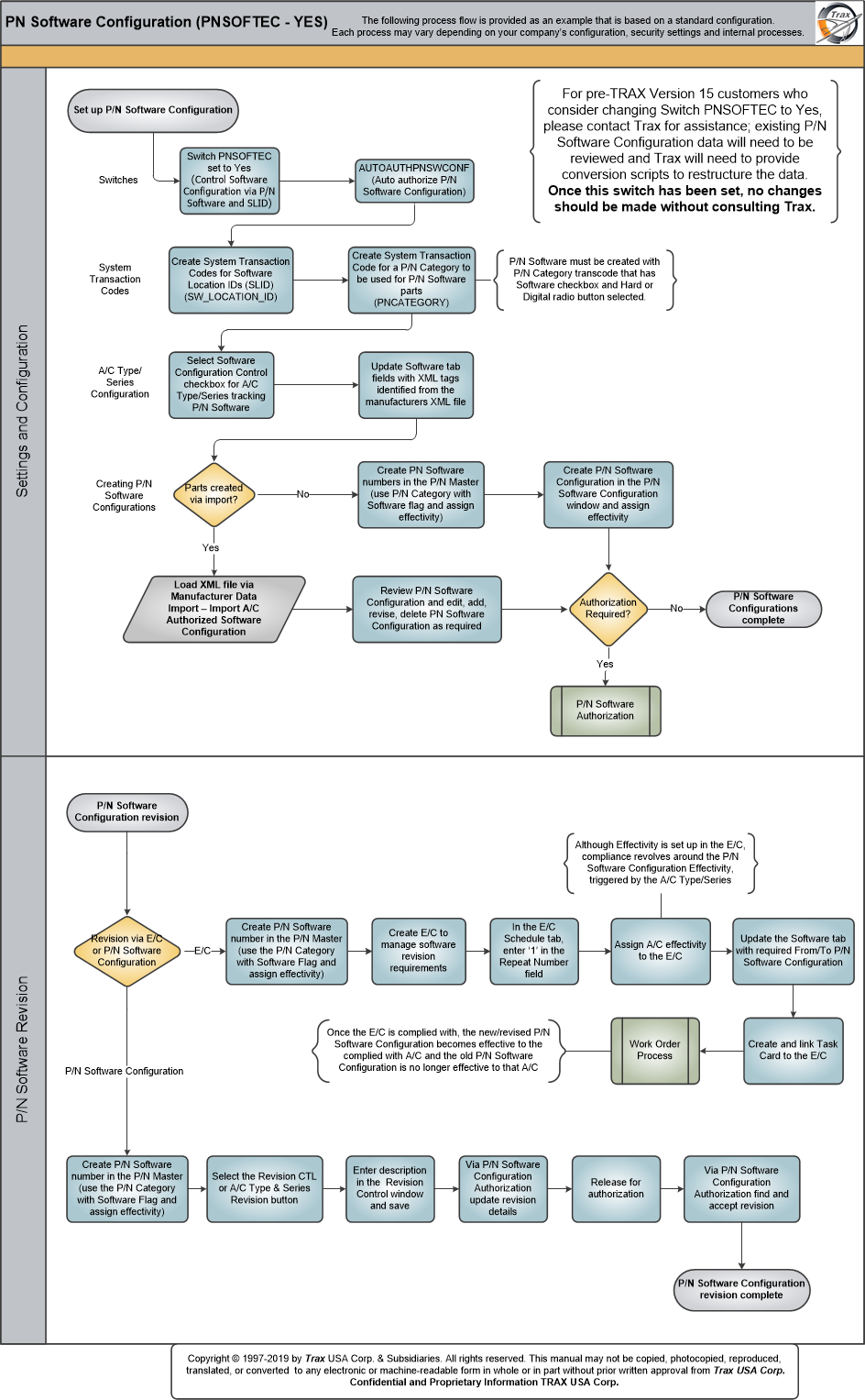
P/N Software Configuration functionality allows customers to keep track of each aircraft's software infrastructure. P/N Software Configuration functionality, being introduced in TRAX Version 15, with Settings Switch  PNSOFTEC set to Yes, provides customers an easy and more efficient method of tracking software on an A/C; eliminating the obligation to track software on individual P/N S/Ns, or having to carry out A/C P/N Transactions to upload software and installed and remove parts on-wing.
When Settings Switch PNSOFTEC is set to Yes, P/N Software Configuration is tracked using the P/N Software number and Software Location Identification (SLID). P/N Software is tracked against the A/C, and A/C Engineering Controls are used to update, revise, and track E/C compliances. A Software tab is available in the A/C Type/Series window; this tab allows customers to enter XML reference points (tags), identified from the XML file provided by the A/C manufacturer, that serve as markers during the Manufacture Data Import load to build the P/N Software Configuration - and only one data import is required. In addition, a Software tab is available in the Engineering Control window; users can specify that when compliance to the E/C is carried out, the P/N Software number gets updated to the latest software revision. A compliance record is recorded once the E/C is complied with, and the system removes effectivity from the previous P/N Software Configuration and creates and adds effectivity to the new P/N Software Configuration.
When PNSOFTEC is set to Yes, the system no longer requires a hardware P/N or Equipment Reference Designator (ERD) to track P/N Software Configuration; these fields will be removed from the system and only P/N Software and SLID fields will be available.
 For pre-TRAX Version 15 customers who consider changing Switch PNSOFTEC to Yes, please contact Trax for assistance; existing P/N Software Configuration data will need to be reviewed and Trax will need to provide conversion scripts to restructure the data. Once this switch has been set, no changes should be made without consulting Trax.
 Share
Print
Share
Print
|
©1997-2026 Trax USA Corp. All rights reserved. This manual may not be copied, photocopied, reproduced, translated, or converted to any electronic or machine-readable form, in whole or in part, without prior written approval from Trax USA Corp. |
 |