
 Share
Share
 Print
Print
|
|
|
|
|


Print Window
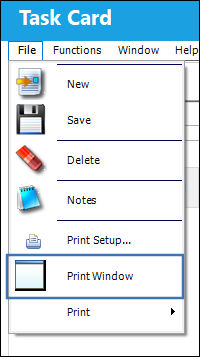
The Print Window  option allows users to quickly print information given in the currently selected window.
From the File Menu tab, select the Print option. The system will then generate the print.
Note: Please review the Print Setup window before selecting this option, as selecting this option will have the system generate the print immediately. It will not allow you to select any printer besides the one set as the default printer beforehand. For more information, please refer to Print Setup.
Share
Print
|
©1997-2026 Trax USA Corp. All rights reserved. This manual may not be copied, photocopied, reproduced, translated, or converted to any electronic or machine-readable form, in whole or in part, without prior written approval from Trax USA Corp. |
 |