
 Share
Share
 Print
Print
|
|
|
|
|


Functions Menu Tab

Note: While the Functions Menu has existed in previously supported version of Trax, the following documentation describes the functionality as it is in Version 12.5 and up, as major revisions have been made to the Functions menu since the release of that version. For more information about the Functions menu in previous versions, refer to Functions Menu Tab [Pre-TRAX 12.5]
The Functions Menu tab is available in all Module-related windows in Trax and acts as a quick access tool to each window's functionalities. The available options shown inside the Functions Menu vary depending on the window that it was accessed from.
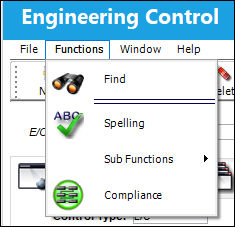
Select the Functions button on the Toolbar to see all the available options in the current window. In this example, the Functions button was selected from inside the Engineering Control window.
Share
Print
|
©1997-2026 Trax USA Corp. All rights reserved. This manual may not be copied, photocopied, reproduced, translated, or converted to any electronic or machine-readable form, in whole or in part, without prior written approval from Trax USA Corp. |
 |