
 Share
Share
 Print
Print
|
|
|
|
|


The R/O Control tab displays the time control information for parts that have P/N Controls and/or P/N E/Cs. The R/O Control tab is used to update P/N Control  and P/N E/C
  schedule information. Below is a list of the fields and their respective functions.
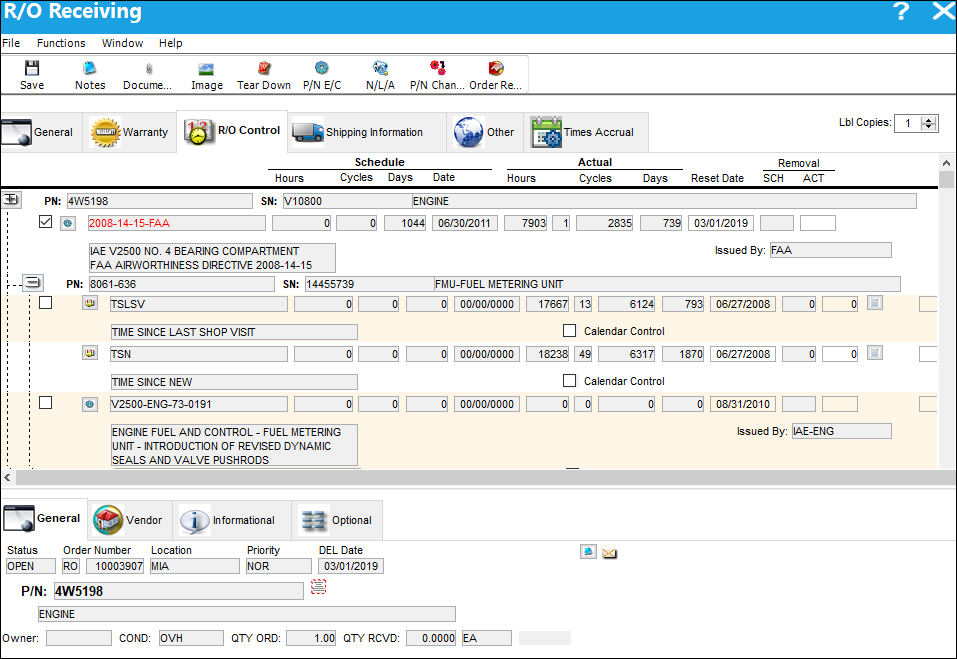
The switch  ROCTLRI determines whether this tab appears in either Order Receiving or Receiving Inspection window. If set to Yes, the system will reset the part control for repair orders after receiving inspection. The R/O Control Tab will appear via the Receiving Inspection option, not the Order Receiving option. If set to NO, the R/O Control Tab will appear via the R/O Receiving window.
The following information/options are available in this window:
_____________________________________________________________________________________
Expand  button/Collapse
  button
Select the Expand button to expand the P/N line for a tree view of all associated Controls and relevant information. Select the Collapse button to collapse the tree.
P/N
The Part Number reference for the aircraft part. Please note that any additional Part Numbers which may appear on this tab may be NLA to the NHA which appears on the airOrder Detail, General tab. ALL NLA component controls will appear under the appropriate P/N S/N.
S/N
The Serial Number for the specific serialized part. Please note that any additional Serial Numbers which may appear on this tab may be NLA to the NHA which appears on the Repair Order Detail, General tab. ALL NLA component controls will appear under the appropriate P/N S/N.
P/N Description
The description of the part.
Select checkbox
Check to make the time control effective to that part number. Once selected, the option to edit the reset date of that particular time control and/or the removal actuals become available (if applicable).
Control
The time control related to the part (e.g., TSN, TSO, etc.) used to define its limits.
Schedule Hours/Cycles/Days
The control's hours/cycles/days schedule, as applicable.
Actual Hours/Cycles/Days
The number of hours/cycles/days accumulated against the time control schedule.
Reset Date
Date and time at which control information was reset for having been performed/complied.
Removal Schedule
The Removal Schedule allows for a method of tracking tire removal information. Upon removal from the aircraft this number will automatically increment for each removal. At Receiving, the Removal Schedule information will appear, can be edited as required or reset with the reset of the P/N Control. Security access to this feature must be granted. The Removal Schedule information can also be updated via Technical Records/ Update/ P/N Control Adjustment.
Removal Actual
The number of times the component has been removed from an aircraft. The actuals' figure is automatically adjusted with each A/C P/N transaction.
Calendar Control
When the Calendar Days/Control checkbox is selected, planning calculates the controls due date based on calendar days starting from the controls Effective Date (reset/last compliance date). When the Calendar Days/Control checkbox is not selected, planning calculates the controls due date starting from the associated P/N S/N installed date (if the P/N S/Ns installed date is after the controls Effective Date).
_____________________________________________________________________________________
Additional Functionality:
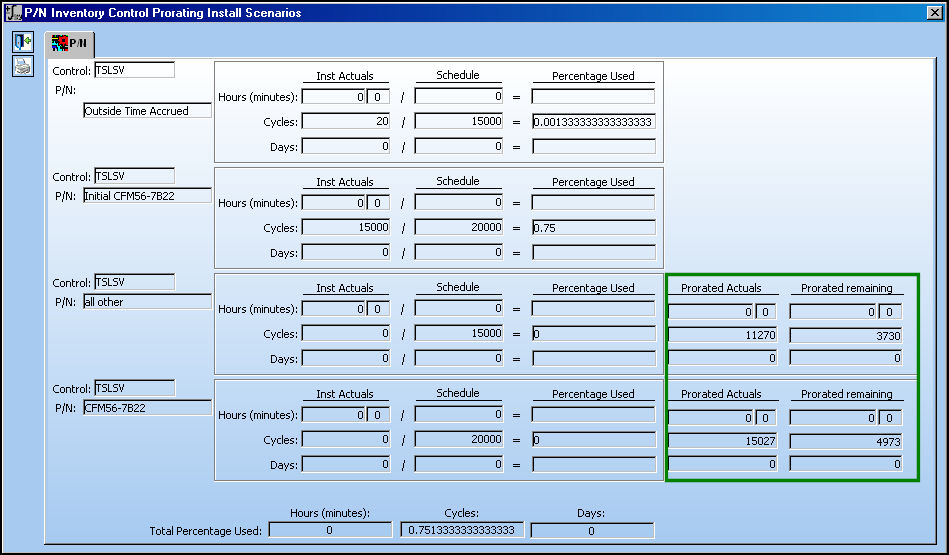
If the Actuals are greater than the Schedule limit, but the proration Actuals are less than the Schedule limit, TRAX will use the Proration Actuals in RO Receiving.
Note the Actuals in the P/N Inventory Control for the following P/N.
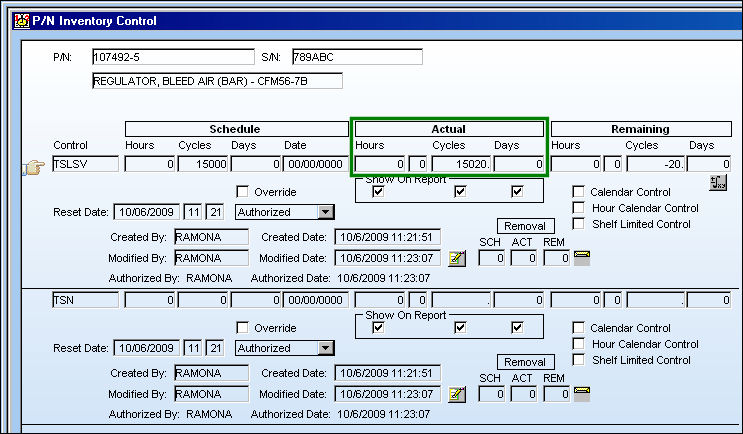
The Prorated Part still displays time remaining even if the Actuals do not:
The part is placed on an RO. Even if the time shows no remaining, it now considers the prorating Actuals and allows the part to be received:
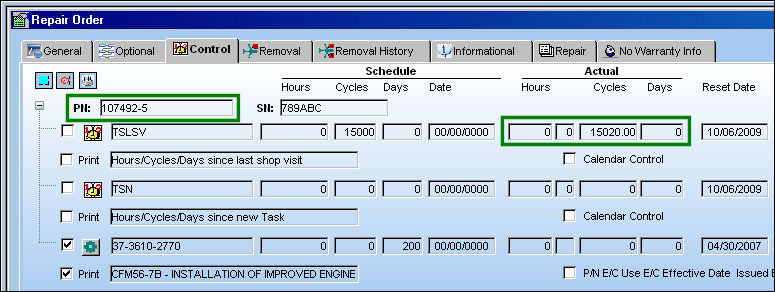
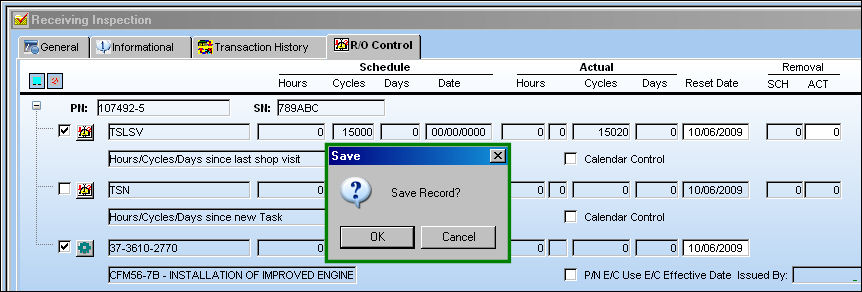
The system allows the part to be received as shown below:
Share
Print
|
©1997-2026 Trax USA Corp. All rights reserved. This manual may not be copied, photocopied, reproduced, translated, or converted to any electronic or machine-readable form, in whole or in part, without prior written approval from Trax USA Corp. |
 |