
 Share
Share
 Print
Print
|
|
|
|
|


The Warranty Schedule for a part can be in the form of Hours/Cycles/Days, A/C Days, or a specific date. Default warranty schedules can be set up for a vendor via Settings/ Update/ Vendor/ Warranty Information tab. The Warranty Actual information is the accumulation of A/C flight Hours/Cycles and A/C Days. The warranty schedule and warranty actuals can be overridden in this window, if required.
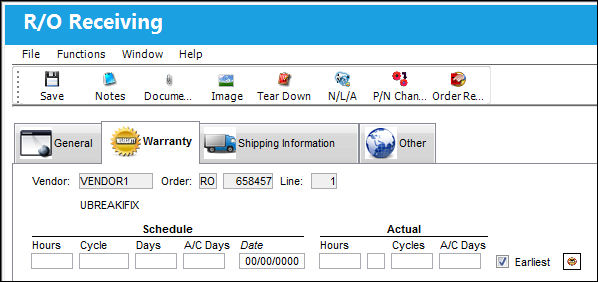
The following information/options are available in this window:
_____________________________________________________________________________________
Vendor
The system code for the service/part provider.
Order
The type of order and the order number for the transaction.
Line
The specific Line item of the Order. Each Line item could represent a different part included in the same order.
Schedule Hours/Cycles/Days
The scheduled number of installed hours/cycles or calendar days for warranty to be applied to a part.
Schedule A/C Days
The scheduled number of installed days for warranty to be applied to a part.
Schedule Date
The warranty expiration date for the part.
Actual Hours/Cycles
The actual number of hours/cycles a component has been installed on an aircraft.
Actual A/C Days
The actual number of installed days the part has accumulated.
Earliest checkbox
When selected, the warranty for a component will expire once one of the following (hours/cycles/days/A/C days) reaches the warranty limit first. When the checkbox is de-selected, the warranty will only expire once ALL warranty limits are met.
Reset Warranty  button
When selected, the system will reset the current information in the Warranty Tab to the previous warranty information for that specific part number/serial number.
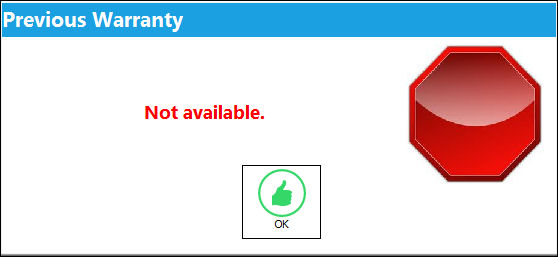
If the part number does not have any historical warranty information, the following prompt will appear:
_____________________________________________________________________________________
Share
Print
|
©1997-2026 Trax USA Corp. All rights reserved. This manual may not be copied, photocopied, reproduced, translated, or converted to any electronic or machine-readable form, in whole or in part, without prior written approval from Trax USA Corp. |
 |