
 Share
Share
 Print
Print
|
|
|
|
|


Receiving Inspection, General Tab
The Receiving Inspection search selection (via the Receiving/Update/Receiving Inspection) is used to search for open receiving inspection transactions in the system. As with the majority of the query selections on the system, it is better to select as many parameters as required to minimize search result.
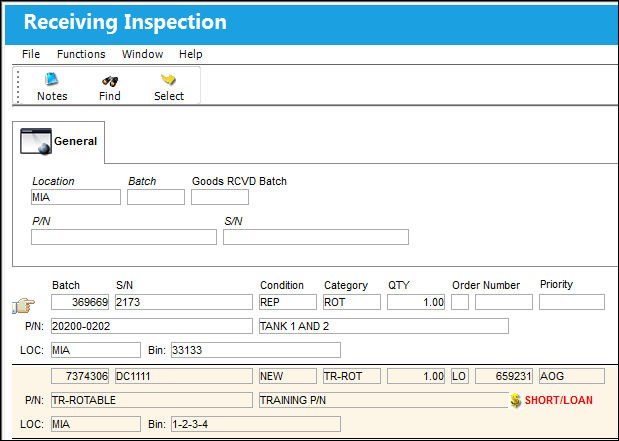
Query:
The following information/options are available in this window:
_____________________________________________________________________________________
Location
The Location for maintenance events, inventory stores, orders, transactions, or training events.
Batch
The inventory number that is currently associated with a part or group of parts. A part's Batch number can change after various types of transactions take place.
Goods RCVD Batch
The original inventory number assigned to the part or group of parts when initially introduced/received into inventory. This number will remain the same for a part even if/when the part's Batch number changes.
Company
The G/L Company that the P/N was assigned to when entered into inventory or ordered. For more information refer to the multi-company functionality explained through Switch  COMPANYMULTI via the G/L Interface Switches Manual.
P/N
The Part Number reference for the aircraft part.
S/N
The Serial Number for the specific serialized part.
_____________________________________________________________________________________
Results:
The following information/options are available in this window:
_____________________________________________________________________________________
Batch
The inventory number that is currently associated with a part or group of parts. A part's Batch number can change after various types of transactions take place.
P/N
The Part Number reference for the aircraft part.
S/N
The Serial Number for the specific serialized part.
Condition
The condition of the part.
Category
The category of the part as defined in Settings/ Explorer/ System Transaction Code Explorer/ Settings/ P/N Category (e.g. Rotable, Consumable, Repairable) and entered for the particular part in the P/N Master.
Qty
The quantity or parts being inspected.
Order Number
The type of order and the order number for the transaction.
Notes  icon
icon
Indicates whether or not a note is attached to the order.
P/N Description
The description of the part.
Location
The Location for maintenance events, inventory stores, orders, transactions, or training events.
Bin
The specific storage bin within the inventory location.
Company
The G/L Company that the P/N was assigned to when entered into inventory or ordered.
Owner
The name of the owner of the part, when applicable.
This field is only displayed if the part is an owned part. Otherwise, the field is not available.
RI Unlock  button
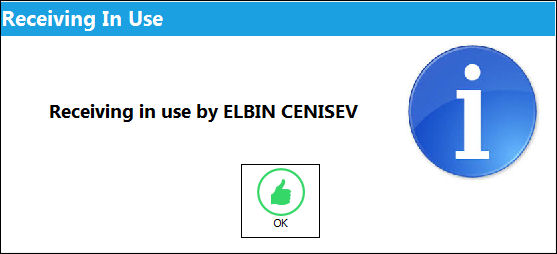
The RI Unlock button allows users to remove the locked status to Receiving Inspection records that are ‘In Use’ by another employee. Receiving Inspection records are automatically locked when another user is accessing the record. The locked status prevents multiple users from editing the record at the same time. If the locked record needs to be unlocked, the RI Unlock button can be selected. This button only appears next to records that are currently 'In Use'.
 This button is security controlled via Receiving/ Update/ RI Unlock Button. For additional information, refer to the Security Explorer via the System Administration Training Manual.
If the record is locked by a user, the following prompt appears when another user attempts to access the record.
_____________________________________________________________________________________
Share
Print
|
©1997-2026 Trax USA Corp. All rights reserved. This manual may not be copied, photocopied, reproduced, translated, or converted to any electronic or machine-readable form, in whole or in part, without prior written approval from Trax USA Corp. |
 |