
 Share
Share
 Print
Print
|
|
|
|
|


Company Profile, General Tab
The General Tab is used to store the basic information about your company such as the company name, mailing and shipping addresses. The company name and details appear on all relevant documentation produced by the system. For a single company there should be only one record here.
There is an entry visible (set up from installation) in the General Tab.
Changing these details may affect other users.
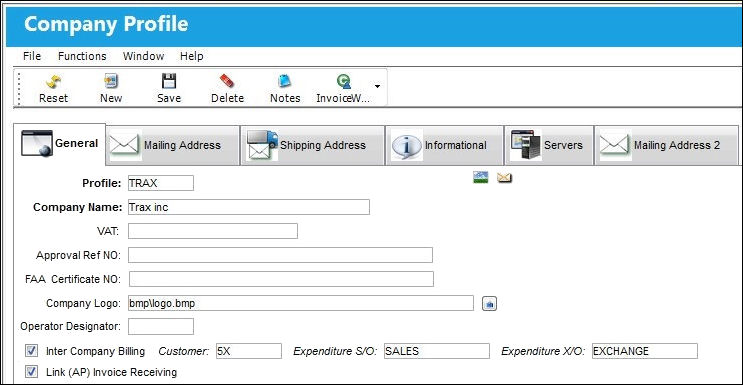
The following information/options are available in this window:
_____________________________________________________________________________________
Profile
Enter the Company code name for the company profile.
Company Name
Enter the name of company.
VAT
Allows the user to add a Value After Tax percentage to the order. This is set up through the VAT Code System Tran Code.
Approval Ref NO
Enter the Approval ref number. This is informational only.
FAA Certificate NO
Enter the FAA Certificate number. This is informational only.
Company Logo
Select a logo to appear in Control Panel. The Browse  button can be used to attach the correct file in the Company Logo field.
Operator Designator
The FAA assigned code for the entity operating the aircraft or the repair station.
Inter Company Billing checkbox 
Select this checkbox if the company would like to bill a third party.
Customer
The customer who will take over ownership of a part when a part is moved from one company to another.
Expenditure S/O
The S/O (Sales Order) Expenditure Code.
Expenditure X/O
The X/O (Exchange Order) Expenditure Code.
Link (AP) Invoice Receiving 
Select this checkbox to grant AP Invoice access to the selected Company Profile. This functionality is in effect when Link switch  LINK/COMPANY/PROTECT is set to Yes.
_____________________________________________________________________________________
Share
Print
|
©1997-2026 Trax USA Corp. All rights reserved. This manual may not be copied, photocopied, reproduced, translated, or converted to any electronic or machine-readable form, in whole or in part, without prior written approval from Trax USA Corp. |
 |