
 Share
Share
 Print
Print
|
|
|
|
|


Enrolling in Classes, via Training Class Employee Enroll/Cancel
You can enroll in classes that are displayed in the Available Classes section by simply drag-and-drop them in the Enrolled Classes area.
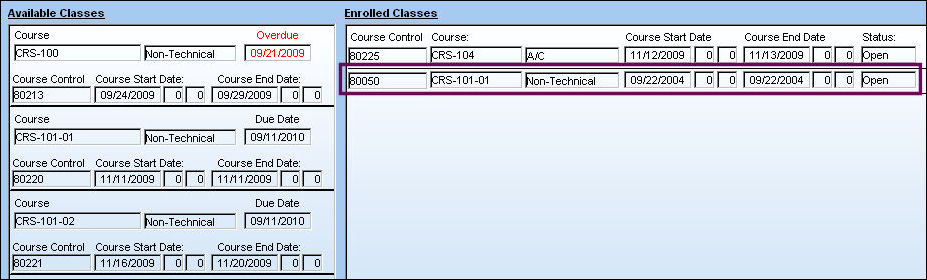
Click on the course you wish to enroll in and with the right mouse click held, drag the course to the Enrolled Classes area. Drop the course there. A pop-up message asks you to confirm. Press YES and you will see that data of the course showing up in Enrolled Courses area now.
In this example, the user is enrolling to the ‘Safety Refresher Course':
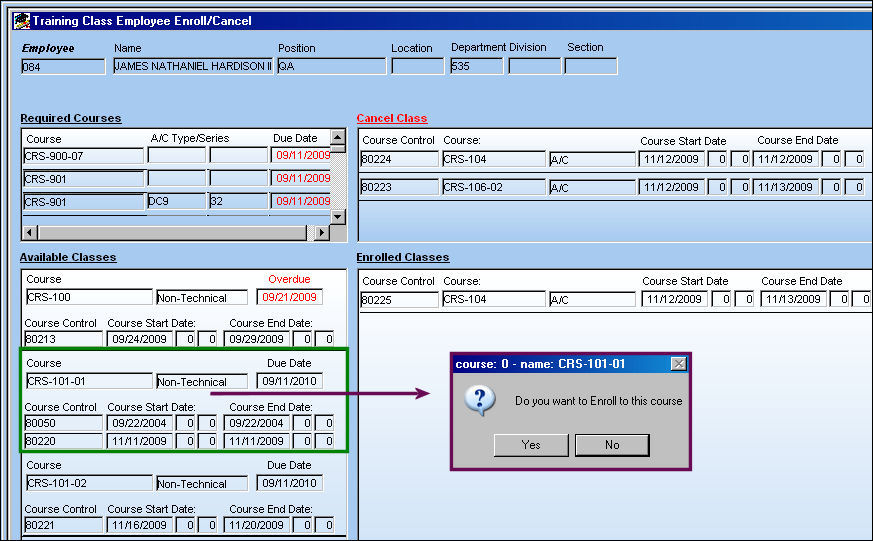
The user is enrolled in the course as shown below:
Share
Print
|
©1997-2026 Trax USA Corp. All rights reserved. This manual may not be copied, photocopied, reproduced, translated, or converted to any electronic or machine-readable form, in whole or in part, without prior written approval from Trax USA Corp. |
 |