
 Share
Share
 Print
Print
|
|
|
|
|


Cancellation of Enrollment, via Training Class Employee Enroll/Cancel
If an employee is enrolled in a course they do not want to/cannot attend, they may cancel enrollment.
From the Enrolled Classes area, drag-and-drop the course(s) to be canceled into the Cancel Class area.
A pop-up window appears confirming the cancellation:
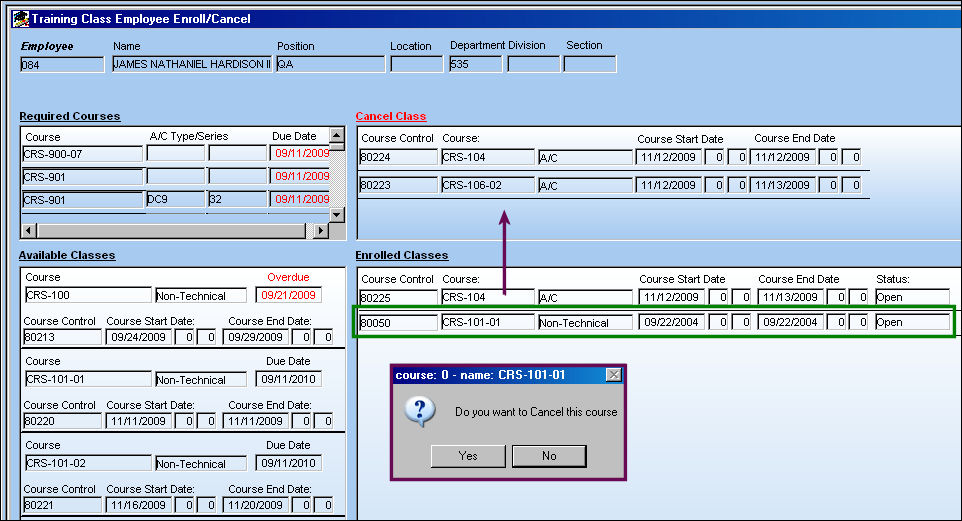
Select 'Yes' to confirm the cancellation, or 'No' to cancel.
In this example, the user will select 'Yes.'
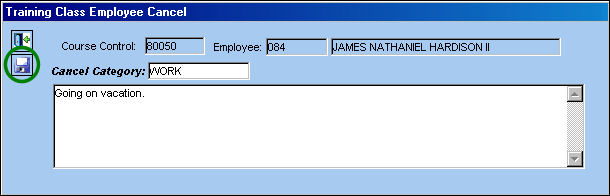
The following window appears. Enter a reason for the cancellation and select the Save  button.
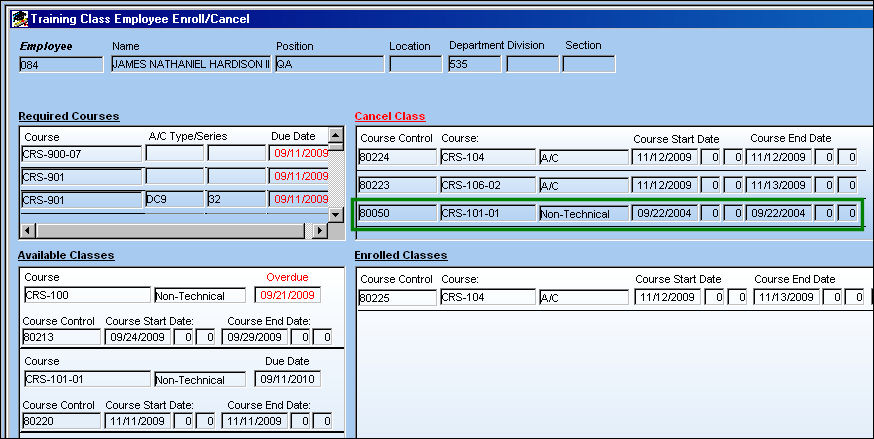
Enrollment in this course will be canceled and the record will show up in the Cancel Class area:
Share
Print
|
©1997-2026 Trax USA Corp. All rights reserved. This manual may not be copied, photocopied, reproduced, translated, or converted to any electronic or machine-readable form, in whole or in part, without prior written approval from Trax USA Corp. |
 |