
 Share
Share
 Print
Print
|
|
|
|
|


Training Course Completion Approval, General Tab
Locate the employee’s record that awaits Completion Approval.
As with the majority of the query selections on the system, it is better to select as many parameters as required to minimize search results.
Once the criteria has been selected, click on the Find  button. The search results will appear as shown below:
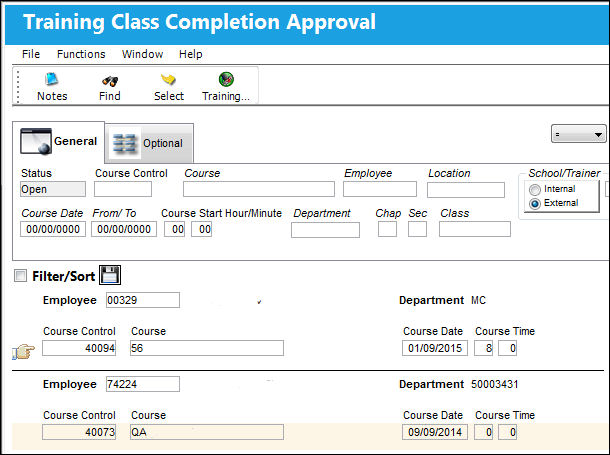
The following information/options are available in this window:
_____________________________________________________________________________________
Status
The status of the course, i.e. open, pending. Upon initial set up of a class, select ‘Open.' The class will automatically go to ‘Closed’ status once all the employees who are enrolled have completed the course.
Training Course Control
The identification number or name of the course.
Training Course
Choose from the list of previously created Training Courses (that were created via the Training Course Registration option). Use the drop list within the drop down selection to narrow your search parameters. Once you have filled the field with a valid previously created Training Course, most of the fields will automatically fill with the related information. To customize this particular class, you can edit most of the fields as desired.
Employee
The employee registered/enrolled in the course.
Location
The Location for maintenance events, inventory stores, orders, transactions, or training events.
Internal/External
Indicates if this class will be conducted by an internal or external source.
Course Date (From -To)
The start/end date of the course.
Course Start (Hour/Minute)
The start time of the course.
Department
The department of the Employee.
Chapter/Section
ATA Chapter and Section reference.
Class
The Class to which the Employee has completed.
_____________________________________________________________________________________
Only employee records that await Training Course Completion Approval will appear in the list (i.e. records that have had their Completion status changed to ‘Completed’ via the Training Course Completion option).
Remember that if the Training Course contains Subject/Tasks, as the status of each Subject/Task changes to ‘Completed’ (via the Training Course Completion option), that individual Subject/Task will be moved to this list for grading (Pass/Fail). If the status has not yet been changed to ‘Completed’, that particular Subject/Task will not appear in this list.
Share
Print
|
©1997-2026 Trax USA Corp. All rights reserved. This manual may not be copied, photocopied, reproduced, translated, or converted to any electronic or machine-readable form, in whole or in part, without prior written approval from Trax USA Corp. |
 |