
 Share
Share
 Print
Print
|
|
|
|
|


Training Course Completion Approval Detail
The Training Course Completion Approval Detail, General tab presents the following:
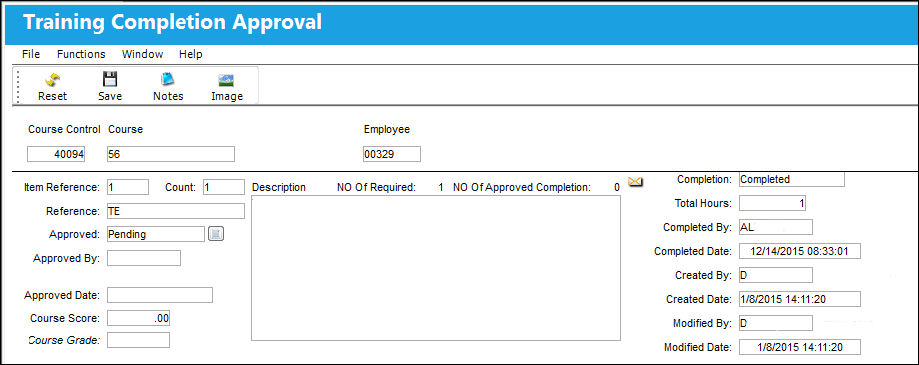
The following information/options are available in this window:
_____________________________________________________________________________________
Course Control
The identification number or name of the course.
Course
The Course name and type (Aircraft courses, non-aircraft courses).
Employee
The employee registered/enrolled in the course.
Item Reference
The item reference for this specific task.
Count
The number of times to which the course has been taken by the employee.
Reference
Any reference information regarding the class.
Approved
Choose from one of the following:Passed, Failed, or Pending.
Passed - When selected, the item will remain in the queue holding the 'Passed' status until all Subjects/Tasks associated with the Training Course have been 'Passed.'
Failed - When selected, the item will be removed from this queue and sent back to the Training Course Completion queue where it will await the Completion status to be changed to 'Completed' again.
Pending - When selected, the item will remain in this queue for Completion Approval at a later date.
Approved By
The trainer who approved the course completion for the course.
Approved Date
The date the course completion was approved.
Course Score
The Training Course final score.
If the final score does not meet the Minimum Grade, the system will display the following error:
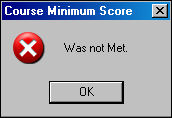
For additional information regarding the Minimum Grade, refer to the Training Course Registration, General Tab, via Training Course Completion of the Training Manual.
Course Grade
The Training Course final grade.
_____________________________________________________________________________________
Use any vertical or horizontal scroll bars that appear to navigate the entire window. The user will have the ability to adjust the hours completed (Total Hours field) on this window if required. Scroll to the right to view the Total Hours field. Once all Subjects/Tasks are ‘Passed’, the user will be presented with the Training Final Approval window.
The Notes  and Image
  buttons are available for additional functionality.
Share
Print
|
©1997-2026 Trax USA Corp. All rights reserved. This manual may not be copied, photocopied, reproduced, translated, or converted to any electronic or machine-readable form, in whole or in part, without prior written approval from Trax USA Corp. |
 |