
 Share
Share
 Print
Print
|
|
|
|
|


Training Final Approval
The Training Final Approval window will appear for you to record the final information regarding this employee and the Training Course after the employee completes all Subjects/Tasks (if applicable). The Training Course must also be ‘Passed’ by the instructor or authorized personnel and saved in the Training Course Completion Approval Detail.
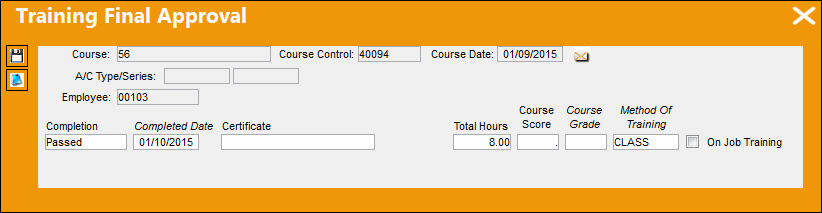
The following information/options are available in this window:
_____________________________________________________________________________________
Completion
The ‘Passed’ status will appear here.
Completed Date
The current date will appear here and may be changed as required.
Certificate
The Certificate name/number that was issued to the employee (if applicable).
Total Hours
The total hours earned for passing this Training Course.
Course Score
The Training Course final score.
Course Grade
The Training Course final grade.
Method Of Training
The method of training to be used to conduct the class.
On Job Training checkbox
If this Training Course is ‘On Job Training.' This will appear as originally defined in the Training Course Registration process and can be changed if necessary. Informational only.
_____________________________________________________________________________________
Once you have filled all required and any optional fields as desired, click on the Save  button to complete the process.
A window will appear that allows you to print or email a certificate for the course.
Additionally, the Notes  button is available to include information relevant to the record.
Share
Print
|
©1997-2026 Trax USA Corp. All rights reserved. This manual may not be copied, photocopied, reproduced, translated, or converted to any electronic or machine-readable form, in whole or in part, without prior written approval from Trax USA Corp. |
 |