
 Share
Share
 Print
Print
|
|
|
|
|


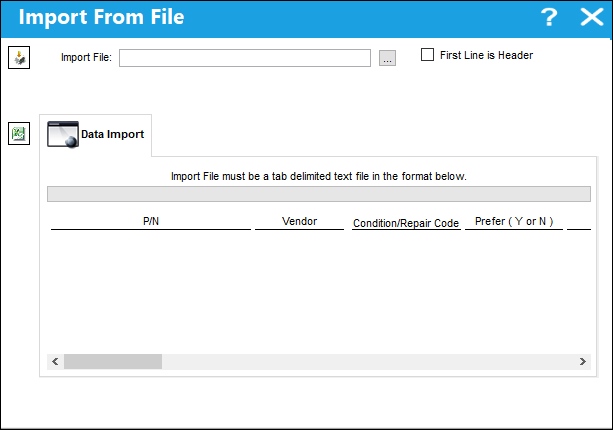
From the Vendor P/N Information window, select the Import  button for the quick import of many records (instead of manually entering) into the Vendor P/N Information window.
First the user must prepare the file. For information regarding how to prepare the import file, refer to Preparing File For Import, via the Import Button of the System Standards Training Manual.
Criteria for Vendor P/N Information Import file:
Release |
Column Name |
Data Type |
Limitation |
Path |
||
|
PN Interchangeable |
Alphanumeric |
25 |
Settings/ Update/ P/N Master/ PN Interchangeable Button/ Cost, General tab |
||
|
Vendor |
Alphanumeric |
10 |
Settings/ Update/ P/N Master/ PN Interchangeable Button/ Cost, General tab |
||
|
Condition |
Alphanumeric |
10 |
Settings/ Update/ P/N Master/ PN Interchangeable Button/ Cost, General tab |
||
|
Prefer |
Checkbox |
1 |
Settings/ Update/ P/N Master/ PN Interchangeable Button/ Cost, General tab |
||
|
Price |
Numeric |
5 |
Settings/ Update/ P/N Master/ PN Interchangeable Button/ Cost, General tab |
||
|
Currency |
Alphanumeric |
8 |
Settings/ Update/ P/N Master/ PN Interchangeable Button/ Cost, General tab |
||
|
Lead Days |
Numeric |
4 |
Settings/ Update/ P/N Master/ PN Interchangeable Button/ Cost, General tab |
||
|
Warranty Hours |
Numeric |
5 |
Settings/ Update/ P/N Master/ PN Interchangeable Button/ Cost, Warranty tab |
||
|
Warranty Cycles |
Numeric |
5 |
Settings/ Update/ P/N Master/ PN Interchangeable Button/ Cost, Warranty tab |
||
|
Warranty Days |
Numeric |
5 |
Settings/ Update/ P/N Master/ PN Interchangeable Button/ Cost, Warranty tab |
||
|
Schedule AC Days |
Numeric |
5 |
Settings/ Update/ P/N Master/ PN Interchangeable Button/ Cost, Warranty tab |
||
|
Minimum Order QTY |
Numeric |
5 |
Settings/ Update/ P/N Master/ PN Interchangeable Button/ Cost, General tab |
||
|
Valid Until Date |
Numeric |
8 |
Settings/ Update/ P/N Master/ PN Interchangeable Button/ Cost, General tab |
||
|
Minimum Order QTY 2 |
Numeric |
5 |
Settings/ Update/ P/N Master/ PN Interchangeable Button/ Cost, General tab |
||
|
Price 2 |
Numeric |
9 |
Settings/ Update/ P/N Master/ PN Interchangeable Button/ Cost, General tab |
||
|
Minimum Order QTY 3 |
Numeric |
5 |
Settings/ Update/ P/N Master/ PN Interchangeable Button/ Cost, General tab |
||
|
Price 3 |
Numeric |
9 |
Settings/ Update/ P/N Master/ PN Interchangeable Button/ Cost, General tab |
||
|
Minimum Order QTY 4 |
Numeric |
5 |
Settings/ Update/ P/N Master/ PN Interchangeable Button/ Cost, General tab |
||
|
Price 4 |
Numeric |
9 |
Settings/ Update/ P/N Master/ PN Interchangeable Button/ Cost, General tab |
||
|
Under Contract |
Checkbox |
1 |
Settings/ Update/ P/N Master/ PN Interchangeable Button/ Cost, General tab |
||
|
Earliest |
|
|
1 |
Settings/ Update/ P/N Master/ PN Interchangeable Button/ Cost, Warranty tab |
|
|
Auto RO Locations |
Alphanumeric |
8 |
Settings/ Update/ P/N Master/ PN Interchangeable Button/ Cost, General tab |
||
|
RO Global |
Checkbox |
1 |
Settings/ Update/ P/N Master/ PN Interchangeable Button/ Cost, General tab |
||
|
Component Group |
Alphanumeric |
35 |
Settings/ Update/ P/N Master/ PN Interchangeable Button/ Cost, General tab |
||
|
Priority |
Alphanumeric |
8 |
Settings/ Update/ P/N Master/ PN Interchangeable Button/ Cost, General tab |
||
|
UOM |
Alphanumeric |
10 |
Settings/ Update/ P/N Master/ PN Interchangeable Button/ Cost, General tab |
||
|
Contract |
Alphanumeric |
8 |
Settings/ Update/ P/N Master/ PN Interchangeable Button/ Cost, General tab |
||
|
Standard time |
Alphanumeric |
6 |
Settings/ Update/ P/N Master/ PN Interchangeable Button/ Cost, General tab |

Go to Settings/ Update/ P/N Master/ Interchangeable button/ Cost button. Select the Import button.
Complete all of the Import steps.
For information regarding how to Import a file, refer to Importing a File via Import Button of the System Standards Training Manual.
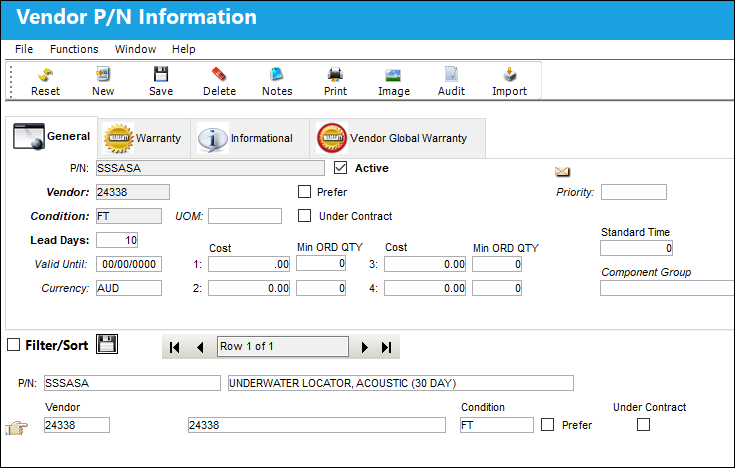
The imported Vendor P/N Information appears as shown below:
Share
Print
|
©1997-2026 Trax USA Corp. All rights reserved. This manual may not be copied, photocopied, reproduced, translated, or converted to any electronic or machine-readable form, in whole or in part, without prior written approval from Trax USA Corp. |
 |