
 Share
Share
 Print
Print
|
|
|
|
|


The P/N Interchangeability, Reliability tab allows the user to enter the following information:
 The P/N Interchangeability, Reliability tab is security controlled via Settings/ Update/ P/N/ P/N Interchangeable Reliability. The tab and the information within the tab will always be visible, however, if security is enabled, all fields will be greyed out and the user will not be able to update the information within the tab. For additional information, refer to the Security Explorer via the System Administration Training Manual.
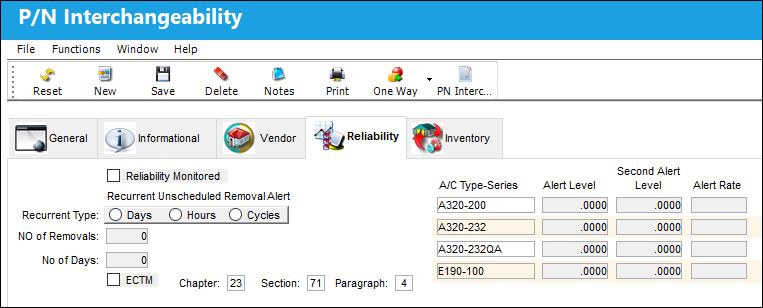
The following information/options are available in this window:
_____________________________________________________________________________________
Reliability Monitored
Select this checkbox to have the Reliability module provide statistical data (on reports and Recurrent Alert Items) regarding the reliability of this particular part. Reports can then be filtered to display only parts that are “Reliability Monitored.”
Recurrent Type Days/Hours / Cycles
Consists of an unlimited amount of 7-day week periods that are merged to create a cycle. Recurrent patterns can start for any employee on either of the weeks of the pattern. When the last week of the pattern passes the first week will follow; the cycle will start from the beginning.
No Of Removals
Amount of times the Part was removed.
No of Days
Amount of Days installed.
ECTM
Check the Engine Conditioning Trend Monitoring checkbox to indicate that this part will be monitored appropriately via the Reliability module.
Chapter/ Section/ Paragraph
The ATA chapter/section/paragraph, as applicable.
A/C Type/Series
The Type/Series of Aircraft.
Alert Level
Enter the actual alert level for the A/C Type/Series for the P/N. This may be provided by the A/C manufacturer or can be an organizational standard. P/N Reliability alert level is not required, but will allow alert levels to be shown on various prints. Make sure the Alert level can be applied to the A/C Type-Series indicated in preceding field.
Second Alert Level
Enter the second alert level for the A/C Type/Series for the P/N. P/N Reliability alert level is not required, but will allow alert levels to be shown on various prints. Make sure the Second Alert level can be applied to the A/C Type-Series indicated in preceding field.
Alert Rate
This field is used to define the failure rate alert level which will be used for calculating MTBF (Mean Time between Failures).
_____________________________________________________________________________________
Share
Print
|
©1997-2026 Trax USA Corp. All rights reserved. This manual may not be copied, photocopied, reproduced, translated, or converted to any electronic or machine-readable form, in whole or in part, without prior written approval from Trax USA Corp. |
 |