
 Share
Share
 Print
Print
|
|
|
|
|


Select the A/C P/N Transaction Tab to view the information for any transaction that have been conducted involving the P/N.

The following information/options are available in this window:
_____________________________________________________________________________________
P/N
The Part Number reference for the aircraft part. This is the P/N that was installed or removed during this transaction.
S/N
The Serial Number for the specific serialized part. This is the exact S/N that was installed or removed during this transaction.
Position
The Position where the item that was installed onto or removed from.
Audit  button
Select the Audit button to view any changes that have been made to the part via the Technical Records/Update/A/C P/N Transaction Supervisor.
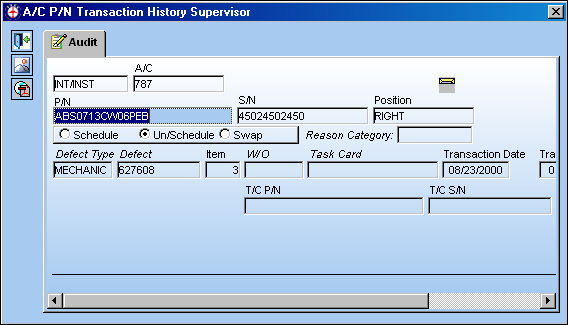
INT/INST
Initial Install.
Schedule radio button
Select this radio button if this is a scheduled component change.
Un/Schedule radio button
Select this radio button if this is an unscheduled component change.
Swap radio button
Select this radio button if this component change is a result of a swap.
This does not effect reliability recurrent alerts. It only affects the Interchange and External Exchange Transaction Types. For additional information, refer to A/C P/N Transaction via the Technical Records Training Manual.
Reason Category
Reason for part number transaction.
Date
The Date of the transaction (on the aircraft).
Tag No.
The tag number associated with the part.
W/O
The Work Order used to categorize, manage, and schedule work requirements for aircraft maintenance.
Task Card
The Task Card / Job Card that details the scheduled maintenance work.
Location
The Location for maintenance events, inventory stores, orders, transactions, or training events.
A/C
The individual aircraft tail number.
T/C P/N
This is the Part Number required. A part number may be specified only one time per Item Number. However, the same part number may be specified on each unique item number if needed.
T/C S/N
This is the Part Number Serial Number the Task Card was used for on the Work Order.
_____________________________________________________________________________________
Share
Print
|
©1997-2026 Trax USA Corp. All rights reserved. This manual may not be copied, photocopied, reproduced, translated, or converted to any electronic or machine-readable form, in whole or in part, without prior written approval from Trax USA Corp. |
 |