
 Share
Share
 Print
Print
|
|
|
|
|


The Registration prompt will display upon creation and saving of a new serialized manual.
The Library Registration Prompt requires action to register the Manual into the system.
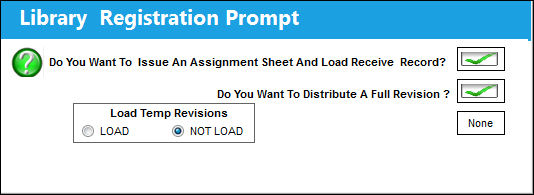
Do You Want To Issue An Assignment Sheet And Load Receive Record?
This Button is used when entering Non-Master Manuals (and revisions) only. Check this Button if you want the system to issue an assignment sheet and load a receiving record for this transaction.
Do You Want To Distribute A Full Revision?
This Button is used when entering MASTER Manuals only. When this Button is checked, above selection (Do You Want To Issue An Assignment Sheet And Load Receive Record?) is automatically selected.
None Button
Load Manual without Receiving Record or Assignment Sheet.
Load Temp Revisions
Choose LOAD to load all open temporary revisions against the newly created serialized Manual. Or, choose NOT LOAD.
Once the Master Manual is inputted, you can create records for any Non-Master Manuals (copies).
Share
Print
|
©1997-2026 Trax USA Corp. All rights reserved. This manual may not be copied, photocopied, reproduced, translated, or converted to any electronic or machine-readable form, in whole or in part, without prior written approval from Trax USA Corp. |
 |