
 Share
Share
 Print
Print
|
|
|
|
|


The Manual Registration option allows for the entry of new Manuals, or searching for existing Manuals.
The first Manual to be entered is the Master Manual.
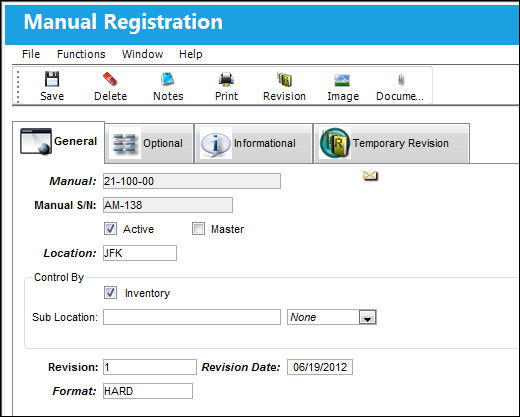
The following information/options are available in this window:
_____________________________________________________________________________________
Manual
The title of the manual.
Manual S/N
The Serial Number of the Manual. This will be unique for each Manual entered.
The sequential numbering system for auto assign S/Ns is set up using configuration Switch  MSNAUTO in the System Configuration Explorer Option.
Active checkbox
This checkbox is selected to mark the status of this Manual active in the system.
Master checkbox
Select if this Manual is the Master.
Location
The location of the manual as entered during manual registration.
Inventory checkbox
Check this box if you want this Manual to become a part of the general inventory for this location. The system will then control Re-order levels for this Manual. Re-order levels are established via Library/Update/Manual Control/Re-order Levels  button.
Sub Location
The sub location can further define where the Manual is stored.
Control By
Choose the entity to assign the Manual to. You can assign to a specific employee, institution and/or vendor, or a specific aircraft. The assigned entity will then receive future Manual revisions. The following field contains a drop list that will contain appropriate choices for the selected entity. According to your selection, the system will ask you to enter more specific information.
Revision
The revision of the manual, according to the manual's manufacturer.
Revision Date
The date of the revision of this Manual.
Format
The Manual format type (i.e. Hardcopy, Microfiche, CD, etc.).
_____________________________________________________________________________________
If a user attempts to enter a manual that already exists in the Manual Master with 'Inactive' status, a soft warning will appear.
Share
Print
|
©1997-2026 Trax USA Corp. All rights reserved. This manual may not be copied, photocopied, reproduced, translated, or converted to any electronic or machine-readable form, in whole or in part, without prior written approval from Trax USA Corp. |
 |