
 Share
Share
 Print
Print
|
|
|
|
|


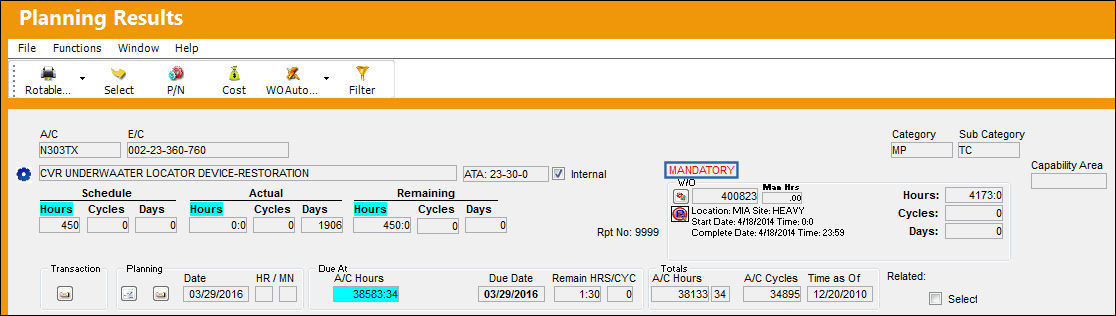
The Mandatory Flag will be displayed for E/Cs that have a Mandatory Classification. For more information refer to the Engineering Control, General Tab via the Engineering - E/C Training Manual.
Additional Functionality:
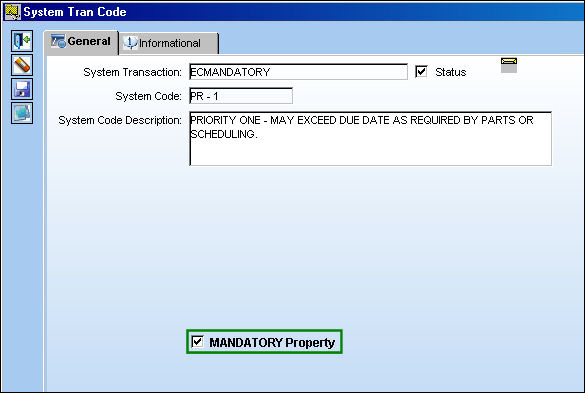
Any E/C Classification can be recognized as mandatory when the Mandatory Property checkbox is selected in the E/C Mandatory Classification transaction code. When this checkbox is selected for a E/C Classification, when queried in Planning the Mandatory Flag will indicate the E/C Classification.
For example, notice that the following E/C Classification has the Mandatory Property checkbox selected.
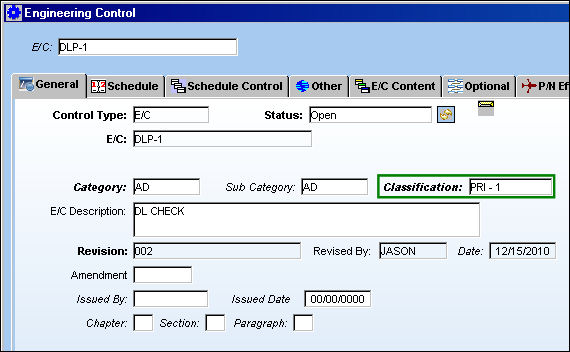
Now notice that the following E/C has the above Classification: 'PRI-1.'
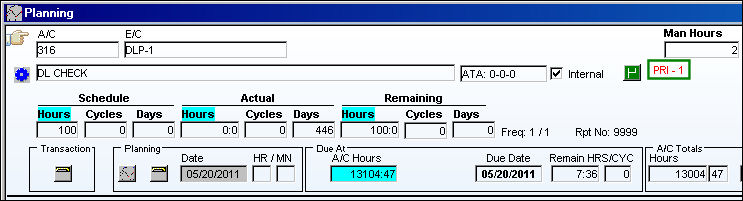
When queried in the Planning Query, the E/C triggers the Mandatory flag which displays the associated E/C Classification ('PRI-1') instead of 'Mandatory.'
For more information refer to the E/C Mandatory Classification via the Engineering Transaction Code Manual.
Share
Print
|
©1997-2026 Trax USA Corp. All rights reserved. This manual may not be copied, photocopied, reproduced, translated, or converted to any electronic or machine-readable form, in whole or in part, without prior written approval from Trax USA Corp. |
 |