
 Share
Share
 Print
Print
|
|
|
|
|


The system offers the opportunity to limit attached files to only those aircraft with effectivity to the attachment. This is done via the Document Control Effectivity button.
Please note that the button will only show up if the System Transaction Switch  DCACEFFT is set accordingly:
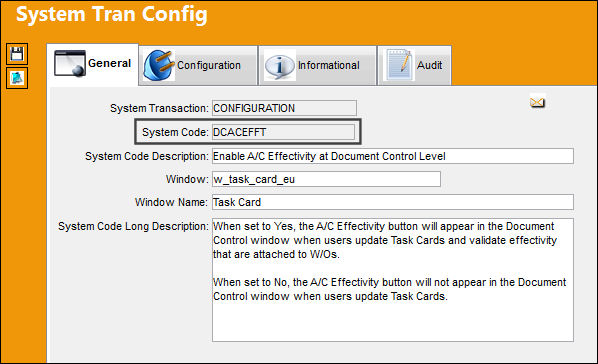
When set to Yes, the A/C Effectivity  button will appear in the Document Control window when users update Task Cards and validate effectivity that are attached to W/Os.
Only Task Cards with attached files will be printed if the Work Order issued for an aircraft is effective.
Select the Aircraft Effectivity button:
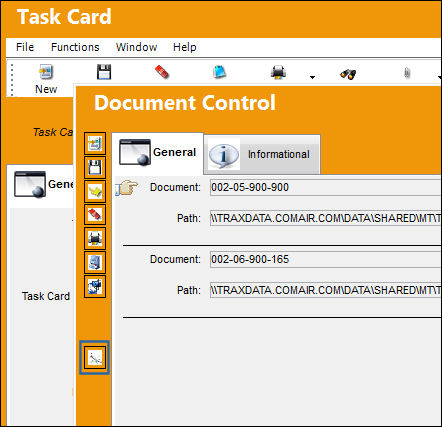
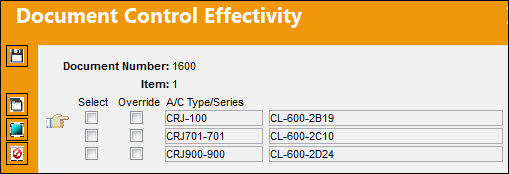
In the window that opens, select all aircraft types that the file is effective for:
Select the Override  button. The user may select or deselect single tail numbers within a type/series range.
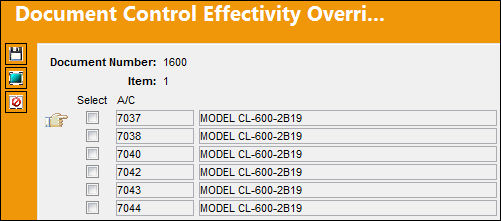
This selection will override the type/series effectivity, (i.e. if a type/series is marked as effective but a single tail number is excluded in the override window, the document will not be made effective against this tail number).
Share
Print
|
©1997-2026 Trax USA Corp. All rights reserved. This manual may not be copied, photocopied, reproduced, translated, or converted to any electronic or machine-readable form, in whole or in part, without prior written approval from Trax USA Corp. |
 |