
 Share
Share
 Print
Print
|
|
|
|
|


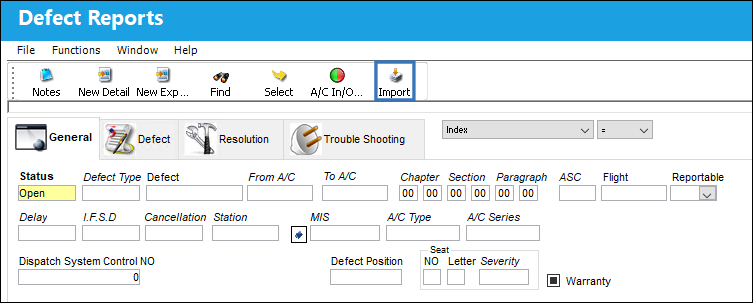
From the Defect Report window, select the Import  button for the quick import of many records (instead of manually entering them) into the Defect Report window.
Once the file has been prepared, go to Technical Records/ Update/ Defect Report.
For information regarding how to prepare the import file, refer to Preparing File For Import, via the Import Button of the System Standards Training Manual.
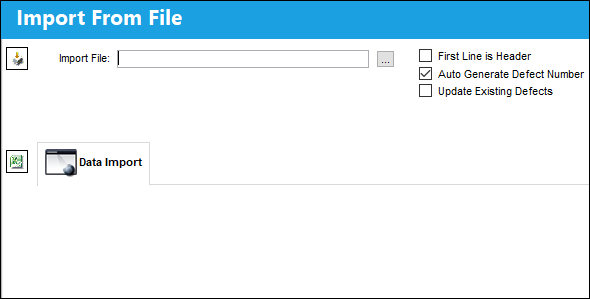
The records appearing in the text file will appear in the Data Import tab of the window.
Criteria for W/O Task Card Import file:
Column Name |
Data Type |
Limitation |
Path |
W/O |
Numeric |
8 |
Technical Records/Update/Defect Report Detail, General Tab/W/O Button |
Defect |
Alphanumeric |
12 |
Technical Records/Update/Defect Report Detail, General Tab. |
Defect Item |
Numeric |
4 |
Technical Records/Update/Defect Report Detail, General Tab. |
Reported Hour |
Numeric |
2 |
Technical Records/Update/Defect Report Detail, General Tab. |
Reported Minute |
Numeric |
2 |
Technical Records/Update/Defect Report Detail, General Tab. |
Reported Date |
Alphanumeric |
8 |
Technical Records/Update/Defect Report Detail, General Tab. |
A/C |
Alphanumeric |
10 |
Technical Records/Update/Defect Report Detail, General Tab. |
Station |
Alphanumeric |
10 |
Technical Records/Update/Defect Report Detail, General Tab. |
Reported By |
Alphanumeric |
10 |
Technical Records/Update/Defect Report Detail, General Tab. |
Chapter |
Numeric |
2 |
Technical Records/Update/Defect Report Detail, General Tab. |
Section |
Numeric |
2 |
Technical Records/Update/Defect Report Detail, General Tab. |
Reference Task Card |
Alphanumeric |
8 |
Technical Records/Update/Defect Report Detail, Resolution Tab. Will be added to the Resolution Description. If a Work Order is created, it will be added as a Scheduled Task Card. If the Work Order already exists, the Reference Task Card will be attached to the already existing Work Order. |
RII By |
Alphanumeric |
10 |
Technical Records/Update/Defect Report Detail, General Tab. |
Defect Description |
Alphanumeric |
4000 |
Technical Records/Update/Defect Report Detail, General Tab. |
Resolution Description |
Alphanumeric |
4000 |
Technical Records/Update/Defect Report Detail, Resolution Tab. |
Defect Type |
Alphanumeric |
8 |
Technical Records/Update/Defect Report Detail, General Tab. |
Reference Sequence Number |
Numeric |
8 |
Technical Records/Update/Defect Report Detail, General Tab. |
Resolved By |
Alphanumeric |
10 |
Technical Records/Update/Defect Report Detail, Resolution Tab. |
Resolved Date |
Alphanumeric |
8 |
Technical Records/Update/Defect Report Detail, Resolution Tab. |
Resolved Hours |
Numeric |
2 |
Technical Records/Update/Defect Report Detail, Resolution Tab. |
Resolved Minutes |
Numeric |
2 |
Technical Records/Update/Defect Report Detail, Resolution Tab. |
References |
Alphanumeric |
25 |
Technical Records/Update/Defect Report Detail, Resolution Tab. |
Status |
Alphanumeric |
10 |
Technical Records/Update/Defect Report Detail, General Tab. If the status selected is not either 'Open' or 'Closed', an Exception will result and the Import will fail. |
Defer |
Alphanumeric |
8 |
Technical Records/Update/Defect Report Detail, Defer Tab. |
Defer By |
Alphanumeric |
10 |
Technical Records/Update/Defect Report Detail, Defer Tab. |
Defer Date |
Alphanumeric |
8 |
Technical Records/Update/Defect Report Detail, Defer Tab. |
Defer To Date |
Alphanumeric |
8 |
Technical Records/Update/Defect Report Detail, Defer Tab. |
MEL |
Alphanumeric |
8 |
Technical Records/Update/Defect Report Detail, Defer Tab. |
MEL Sub |
Alphanumeric |
10 |
Technical Records/Update/Defect Report Detail, Defer Tab. |
MEL Number |
Alphanumeric |
20 |
Technical Records/Update/Defect Report Detail, Defer Tab. |
Defer Category |
Alphanumeric |
10 |
Technical Records/Update/Defect Report Detail, Defer Tab. |
Schedule Hours |
Numeric |
6 |
Technical Records/Update/Defect Report Detail, Defer Tab. |
Schedule Cycles |
Numeric |
6 |
Technical Records/Update/Defect Report Detail, Defer Tab. |
Schedule Days |
Numeric |
6 |
Technical Records/Update/Defect Report Detail, Defer Tab. |
Defer to Hours |
Numeric |
2 |
Technical Records/Update/Defect Report Detail, Defer Tab. |
Defer to Minute |
Numeric |
2 |
Technical Records/Update/Defect Report Detail, Defer Tab. |
Plan Defect |
Alphanumeric |
10 |
Technical Records/Update/Defect Report Detail, Defer Tab. |
Repeat Number |
Numeric |
6 |
Technical Records/Update/Defect Report Detail, Defer Tab. |
Completed Number |
Numeric |
6 |
Technical Records/Update/Defect Report Detail, Defer Tab. |
Defer Hour |
Numeric |
2 |
Technical Records/Update/Defect Report Detail, Defer Tab. |
Defer Minutes |
Numeric |
2 |
Technical Records/Update/Defect Report Detail, Defer Tab. |
Defer Notes |
Alphanumeric |
2000 |
Technical Records/Update/Defect Report Detail, Defer Tab. |
Linking Defect |
Alphanumeric |
12 |
Technical Records/Update/Defect Report Detail, Defer Tab. |
Linking Defect Item |
Numeric |
5 |
Technical Records/Update/Defect Report Detail, Defer Tab. |
Defect Category |
Alphanumeric |
10 |
Technical Records/Update/Defect Report Detail, General Tab. |
ASC Code |
Alphanumeric |
4 |
Technical Records/Update/Defect Report Detail, General Tab. |
Resolution Category |
Alphanumeric |
10 |
Technical Records/Update/Defect Report Detail, General Tab. |
Man Hours |
Numeric |
10 |
Technical Records/Update/Defect Report Detail, General Tab. |
Men Required |
Numeric |
3 |
Technical Records/Update/Defect Report Detail, General Tab. |
Go to Technical Records/ Update/ Defect Report Detail, General Tab. Select the Import button.
Complete all of the Import steps.
For information regarding how to Import a file, refer to Importing a File via Import Button of the System Standards Training Manual.
The imported Defect Report appears as shown below:
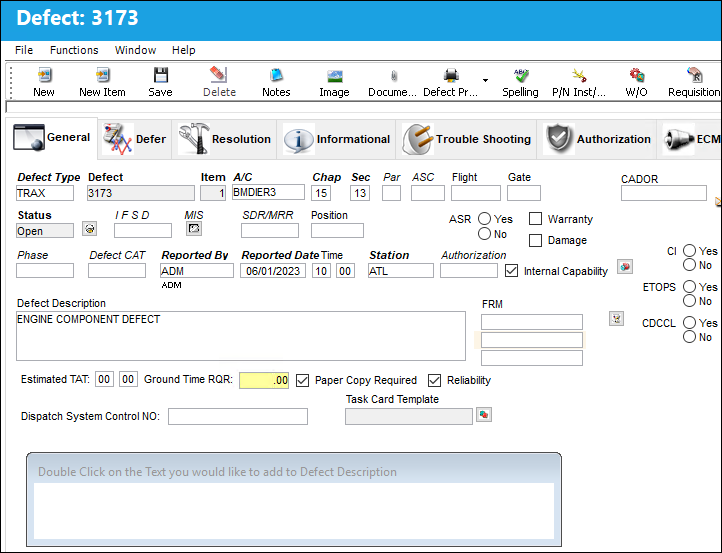
 Note: Existing Defect Reports can be updated and modified using using the defect upload template. When this occurs, the Modified By and Modified Date are updated in the Defect Report Detail, Informational Tab.
Share
Print
|
©1997-2026 Trax USA Corp. All rights reserved. This manual may not be copied, photocopied, reproduced, translated, or converted to any electronic or machine-readable form, in whole or in part, without prior written approval from Trax USA Corp. |
 |