
 Share
Share
 Print
Print
|
|
|
|
|


Select the Prorate  button to access the P/N Control Loaded Times Proration window.
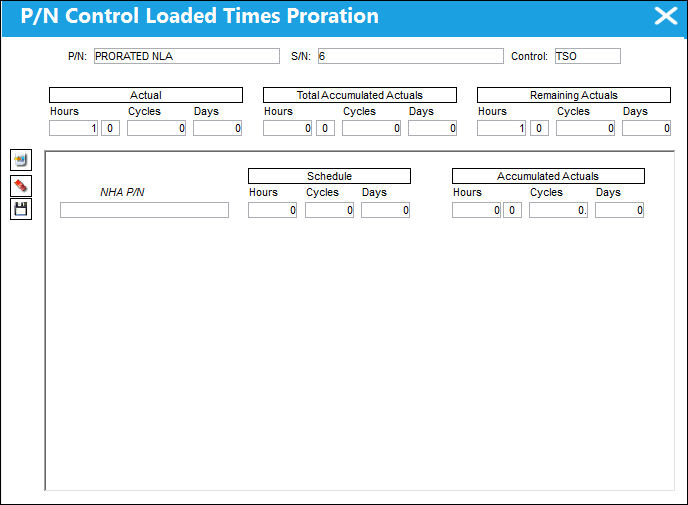
The following information/options are available in this window:
_____________________________________________________________________________________
P/N
The Part Number reference for the aircraft part.
S/N
The Serial Number for the specific serialized part.
Control
P/N Control with the Proration Schedule. For additional information, refer to the P/N Master, P/N Control button via the Settings Training manual.
Actual Hours/Cycles/Days
Total P/N Control actuals.
Total Accumulated Actuals (Hours/Cycles/Days)
Total P/N control prorated actuals.
Remaining Actuals (Hours/Cycles/Days)
The remaining actual times that may not yet have been accounted for in the prorated breakdown by A/C Type/Series or NHA, or may have been accumulated on an A/C Type/Series or NHA which do not have prorated actuals.
If Proration history does exist, this remaining balance will take the lowest defined Proration schedule as it will appear in the P/N Inventory Control Prorating Install Scenarios breakdown window.
Type/Series
The Aircraft Type and Series/Fleet assignment.
Schedule (Hours/Cycles/Days)
The schedule of proration for the A/C Type/Series (or NHA) historically used to calculate the percentage of usage for the proration breakdown. For example, a part was received from company A which used a different schedule of proration for their type and series than company B's schedule of proration (i.e. for B737-700, company A's proration was 4500 cycles, however, company B's proration is 5500 cycles). By default, the schedule will be populated from the Prorations defined in the P/N Master, P/N Control, however may be overridden as required for historical calculations. Multiple entries of the same type/series or NHA can be entered here with different schedules.
The default Prorated Schedule are defined in the P/N Master, P/N Control button. For additional information, refer to Setup a Prorated Part via the Settings Training manual.
Accumulated Actuals (Hours/Cycles/Days)
The historical accumulation of actuals for the type and series. These times (hours/cycles/days) will be used in calculating the percentage of usage for the proration breakdown in conjunction with the schedule times described above.
New  button
Select the New button to open a new type/series or NHA field. Right click in one of these fields to view the selectable proration options. TRAX displays the Select Desired Schedule window. This window contains all the prorated A/C Type/Series or NHAs as defined in the P/N Master, P/N control button. The default schedule will appear, but may be overridden upon selection.
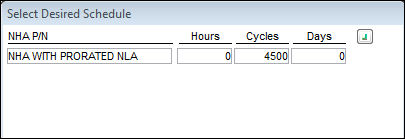
Multiple Schedules can be applied for A/C Type/Series or NHA.
_____________________________________________________________________________________
Select the Delete  button to remove an A/C Type/Series or NHA schedule from the P/N Control Loaded Times Proration window.
Select the Save  button to save an A/C Type/Series or NHA schedule from the P/N Control Loaded Times Proration window.
For P/N Controls with NHA proration schedules, the following window will appear upon selecting the Prorate button:
Multiple NHA P/Ns can be saved:
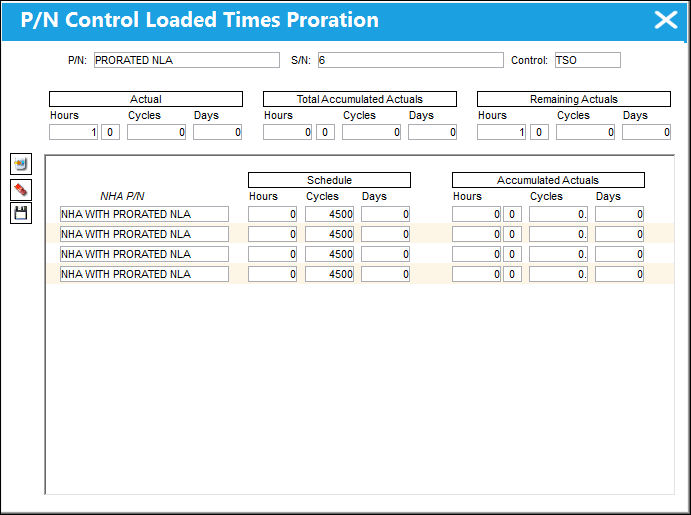
Upon selecting into the NHA field, the selectable proration options will appear.
If the NHA part number changes and a prorated NLA either exists against the NHA or is installed on the NHA, the proration will change accordingly. The NHA part number can occur via Initial Load, A/C P/N Transaction, P/N NLA Installation/Removal, P/N Modify E/C.
Share
Print
|
©1997-2026 Trax USA Corp. All rights reserved. This manual may not be copied, photocopied, reproduced, translated, or converted to any electronic or machine-readable form, in whole or in part, without prior written approval from Trax USA Corp. |
 |