
 Share
Share
 Print
Print
|
|
|
|
|


Inventory Detail Transaction History, General Tab
TRAX displays the General tab as shown below.
The Inventory Detail Transaction History, General Tab is used to query for components based on the following search criteria. Enter any of the below search criteria to query for one or more components and select the Find  button.
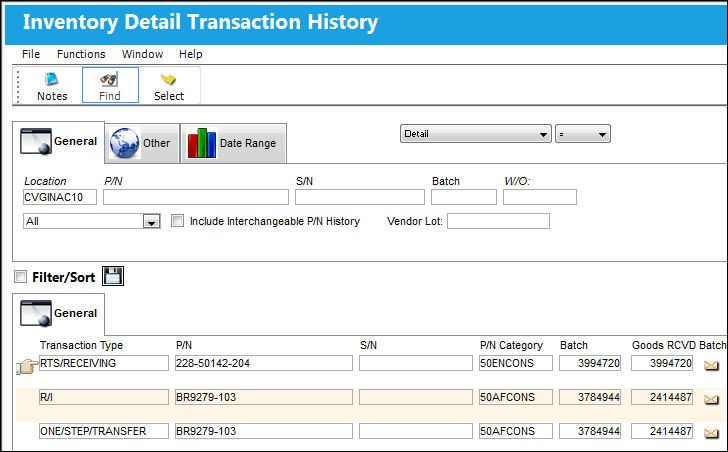
There are additional fields in the lower half of window. To view additional fields, use the scroll bar at the bottom of the window and scroll to the right.
Search Area:
The following information/options are available in this window:
_____________________________________________________________________________________
Drop Down Selection
Select one of the following views from the drop down selection:
Logic drop down 
Select one of the following logic functions to filter for data:
<= Less than or equal to.
<> Not equal to.
= Equal to.
>= Greater than or equal to.
Like Show data like or similar to.
Location
The Location for maintenance events, inventory stores, orders, transactions, or training events.
P/N
The Part Number reference for the aircraft part.
S/N
The Serial Number for the specific serialized part.
Batch
The inventory number that is currently associated with a part or group of parts. A part's Batch number can change after various types of transactions take place.
W/O
The Work Order used to categorize, manage, and schedule work requirements for aircraft maintenance.
Owner
The name of the owner of the part, when applicable.
This is a customized request and may not be available for all customers.
Inventory Type drop down
The type of inventory the item is registered as in the system. The available options are All, General, GSE and Maintenance Inventory. All is set as the default.
Include Interchangeable P/N History checkbox
Select the Include Interchangeable P/N History checkbox to query for main and interchangeable P/Ns. If the Include Interchangeable P/N History checkbox is de-selected, only the main P/N will appear in the query results.
_____________________________________________________________________________________
Users are allowed to reprint the receiving print by selecting the Print  button. See note in the Inventory Detail Transaction History, Other Tab.
Results Area:
The following information/options are available in this window:
_____________________________________________________________________________________
Transaction Type
The transaction that was conducted against the part.
P/N
The Part Number reference for the aircraft part.
S/N
The Serial Number for the specific serialized part.
P/N Category 
The category of the part as defined in Settings/ Explorer/ System Transaction Code Explorer/ Settings/ P/N Category (e.g. Rotable, Consumable, Repairable) and entered for the particular part in the P/N Master.
 Note: This field will display the P/N Category of the part at the time the transaction took place, regardless if the parts P/N Category has been changed.
Batch
The inventory number that is currently associated with a part or group of parts. A part's Batch number can change after various types of transactions take place.
Goods RCVD Batch
The original inventory number assigned to the part or group of parts when initially introduced/received into inventory. This number will remain the same for a part even if/when the part's Batch number changes.
Location
The Location for maintenance events, inventory stores, orders, transactions, or training events.
Bin
The specific storage bin within the inventory location.
Condition
The condition of the part.
QTY
The number of parts for the transaction.
Unit Cost
Cost of the item when purchased (if known).
Secondary Cost
The average cost for the part in your secondary currency.
CUR EXC Rate
The currency exchange rate of the part.
A/C
The individual aircraft tail number.
Line
The line number for this transaction.
Owner
The name of the owner of the part, when applicable.
NHA P/N
The part’s Next Higher Assembly P/N (if applicable).
NHA S/N
Next Higher Assembly (NHA) serial number.
Issued To
Party to which part(s) has/have been issued.
Scrap Code
The Scrap Code for this transaction.
To Location
Destination location code.
To Bin
Destination bin code.
Reference
The reference number for the transaction.
Ship Via
Ship Via code and method to be used.
AWB
The airway bill number related to the part.
Custom Status/Code
Customs status that applies to the part.
Transaction NO
An automatically generated reference number that is assigned to the part number being entered upon save. This transaction number is pulling from P/N Inventory History Next Sequence Number configuration.
Status
The current status of this transaction.
Created By
The user who created the record.
Created Date
The date the record was created.
G/L
The General Ledger account(s) reference used for financial control throughout the system.
Transaction Tag No
The tag number of the transaction to be queried for.
_____________________________________________________________________________________
Share
Print
|
©1997-2026 Trax USA Corp. All rights reserved. This manual may not be copied, photocopied, reproduced, translated, or converted to any electronic or machine-readable form, in whole or in part, without prior written approval from Trax USA Corp. |
 |