
 Share
Share
 Print
Print
|
|
|
|
|


Hypertext
The Hyper Text functionality allows users to view the information related to a selected item (i.e. via System Administration/Explorer/System Transaction Configuration) without having to enter into (double click into) the item. When enabled, a descriptive box containing information about the selected item will appear on the window.
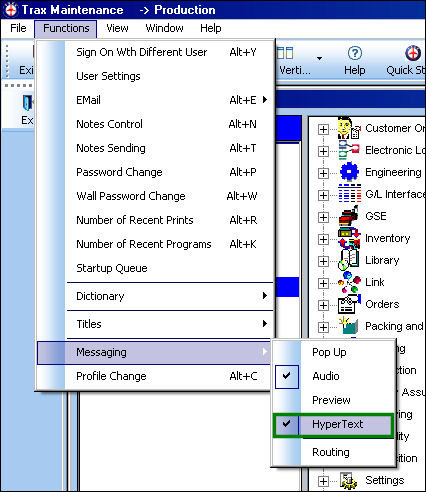
Hypertext is available within many explorers throughout the system.
To enable, go to the appropriate explorer. Go to System Administration/Explorer/System Transaction Configuration. Select the Functions Menu and enable Hypertext.
Once enabled, the informative box will appear when the cursor hovers over any particular switch.
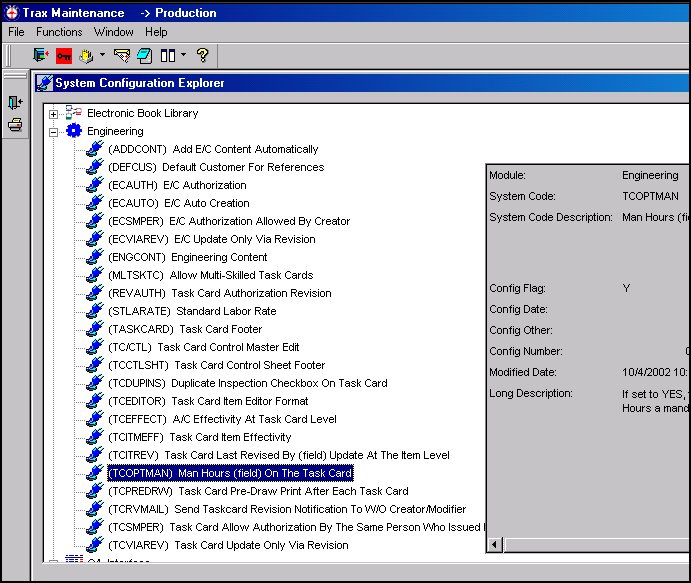
Use any vertical and horizontal scroll bars that appear to navigate the box.
Share
Print
|
©1997-2026 Trax USA Corp. All rights reserved. This manual may not be copied, photocopied, reproduced, translated, or converted to any electronic or machine-readable form, in whole or in part, without prior written approval from Trax USA Corp. |
 |