
 Share
Share
 Print
Print
|
|
|
|
|


Vendor Master, ROS Tab
The Vendor Master, ROS tab displays all ROS messages, except for the ROS_ERROR_MESSAGE. All ROS messages are set up via the Repair Order Service messages System Transaction Code.
If a vendor uses the default exchange service, ROS URL, username, etc. does not need to be set-up.
The ROS_CONFIG.xml file must be uploaded via the Company Profile in order for the ROS tab to be visible in the Vendor Master. For additional information, refer to the ROS Button, via Company Profile which can be found in the Settings Training manual for more information.
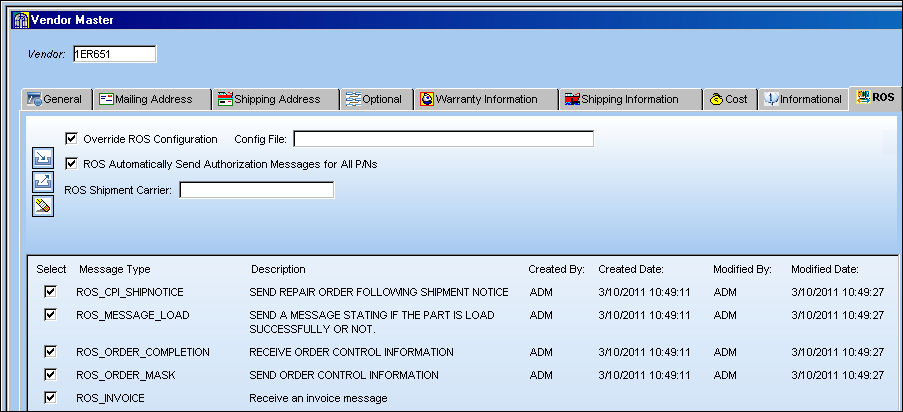
Note: When the ROS_ORDER checkbox is selected, the B2B ID field is available in the Repair Order Header, General tab.
The following information/options are available in this window:
_____________________________________________________________________________________
Override ROS Configuration checkbox
Select the Override ROS Configuration checkbox. The following override options become available:
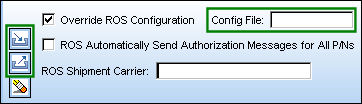
Only the elements that are used for connection to the ROS Service Provider can be overridden. That is, ros_URL, ros_Username, ros_Password and ros_SSL can be overridden.
Config File
ROS Configuration File.
Import File  button
Select the Import File button to import the Config File.
Export File  button
Select the Export File button to export the Config File.
Delete  button
Select the Delete button the delete the Config File.
ROS Automatically Send Authorization Messages for All P/Ns checkbox
Select this checkbox to automatically send ROS authorization messages for all part numbers.
ROS Shipment Carrier
Enter ROS Shipment Carrier name. This is informational only.
_____________________________________________________________________________________
Regardless of which exchange service is being used, the user must setup the message types the vendor is able to send and receive by selecting the message type checkboxes.
A sample of Vendor ROS configuration file is shown below:

Cage Code and IATA Address:
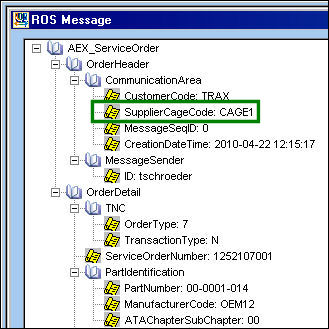
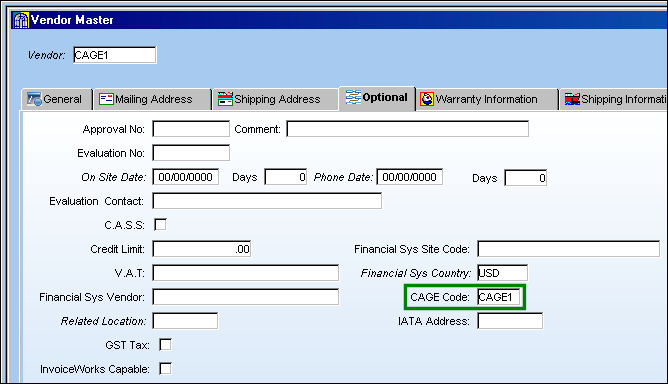
Users must setup Cage Codes for vendors who intend to use ROS functionalities. In the Message Header tag of a ROS message, these codes indicate 'SupplierCageCode':
The setup is in Vendor Master, Optional Tab:
Share
Print
|
©1997-2026 Trax USA Corp. All rights reserved. This manual may not be copied, photocopied, reproduced, translated, or converted to any electronic or machine-readable form, in whole or in part, without prior written approval from Trax USA Corp. |
 |