
 Share
Share
 Print
Print
|
|
|
|
|


MAPI Mail - Send Mail
The Send Mail  button is a standard button found throughout the system. The following is just one example of the Send Mail button as displayed in TRAX.
Select the Send Mail button or the E-mail  button.
TRAX displays the MAPI Mail -Send Mail window.
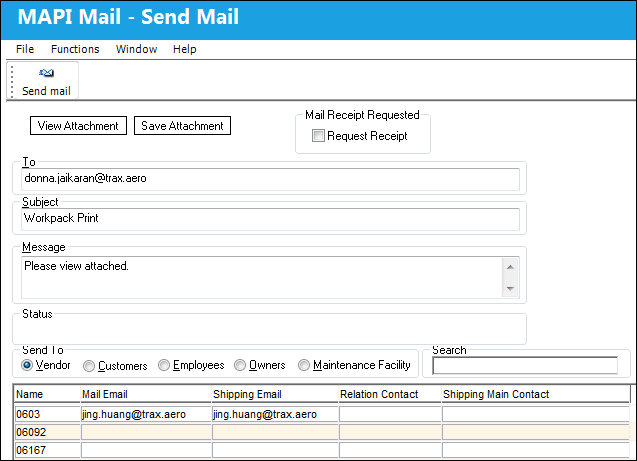
The following information/options are available in this window:
_____________________________________________________________________________________
View button
Select the View Attachment button to view any attachments linked to the email being sent.
Save Attachment button
Select the Save Attachment button to save the attachment to a specified folder.
Request Receipt checkbox
Select this checkbox the receive a notification when the recipient has received the email.
To
Enter the email address of the individual or group the email is being sent to.
Subject
Enter a brief description regarding the email being sent.
Message
Enter a message regarding the email being sent.
Send To Vendor radio button
Select this radio button to have all vendor correspondence information appear in this filter. For additional information, refer to the Vendor Master, which can be found in the Settings Training manual.
Send To Customers radio button
Select this radio button to have all customer correspondence information appear in this filter. For additional information, refer to the Customer Master, which can be found in the Settings Training manual.
Send To Employees radio button
Select this radio button to have all employee correspondence information appear in this filter. For additional information, refer to the Employee Master, which can be found in the Settings Training manual.
Send To Owners radio button
Select this radio button to have all owner correspondence information appear in this filter.
Send To Maintenance Facility radio button
Select this radio button to have all Maintenance Facility correspondence information appear in this filter. For additional information, refer to the Location Master, which can be found in the Settings Training manual.
Search
Enter the name of the Contact Company to search by.
_____________________________________________________________________________________
Send To Vendor radio button:
When the Send To Vendor radio button is selected, the view of the lower half of the MAPI Mail - Send Mail window appears as shown below:
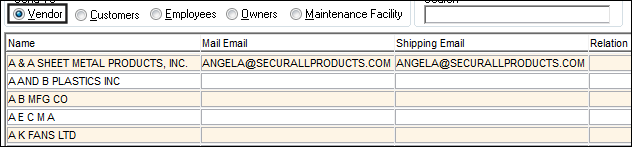
The following information/options are available in this window:
_____________________________________________________________________________________
Name
Name of Contact Company.
Mail Email
The Mail Email address of contact.
Shipping Email
The Shipping Email address of contact.
Relation Contact
The full name of the main contact.
Shipping Main Contact
The main shipping contact.
_____________________________________________________________________________________
The information above is being pulled from the Vendor Master, Employee master or Location Master, depending upon which radio button is selected.
The Send To Vendor, Customers, Employees and Owners radio buttons all share the same column information.
Send To Maintenance Facility radio button:

The following information/options are available in this window:
_____________________________________________________________________________________
Location Description
The location of the Maintenance Facility.
_____________________________________________________________________________________
The information in the above table is being pulled from the Location Master, which can be found in the Settings Training manual.
Share
Print
|
©1997-2026 Trax USA Corp. All rights reserved. This manual may not be copied, photocopied, reproduced, translated, or converted to any electronic or machine-readable form, in whole or in part, without prior written approval from Trax USA Corp. |
 |