
 Share
Share
 Print
Print
|
|
|
|
|


The Inventory Optimization (Rotable), Base Distribution tab is used to calculate the optimum allocation of assets. This allows the user decide on which location(s) are best to store parts based on criteria such as existing inventory, historical records etc.
Once a locations are selected, select the Run Distribution  button to re-run the values in the lower half of the window.
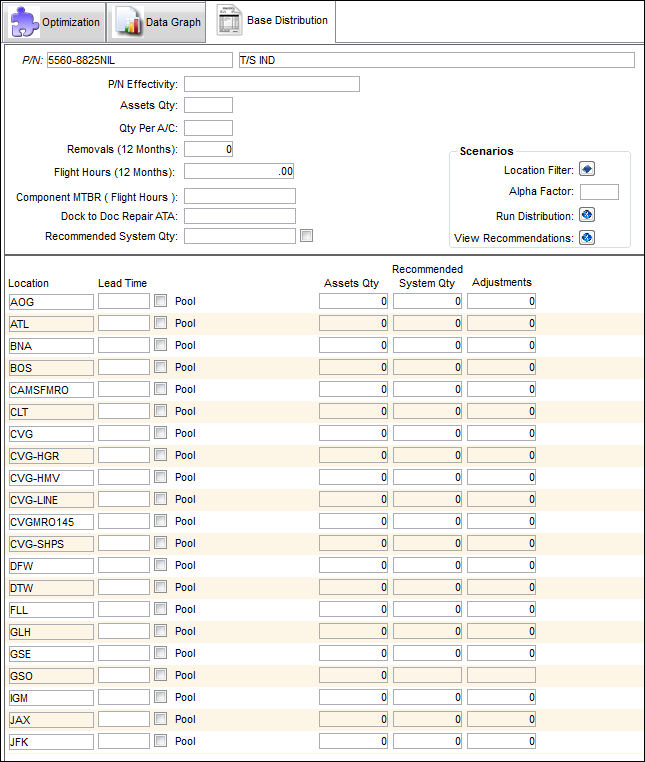
The following information/options are available in this window:
_____________________________________________________________________________________
P/N
The Part Number reference for the aircraft part.
P/N Effectivity
A/C - Tail effective to the P/N
Assets Qty
The quantity available in inventory.
Qty Per A/C
The number of parts needed for each aircraft.
Removals (12 Months)
The number of Removals for a 12 month period.
Flight Hours (12 months)
The flight hours for the aircraft fleet for a 12 month period.
Component MTBR (Flight Hours)
Component MTBR (Mean Time Between Removals) Flight Hours. This value is derived from the following formula:
Component (MTBR) Flight Hours = (QPA * 12 Month Unit Of Measure) / 12 Months Removals
Dock to Dock Repair TAT
Dock to dock Repair TAT (Turn Around Time). This is the time from loading dock to loading dock. This value is derived from the following formula:
Dock to Dock Repair ATA = TAT Target Method + Transportation TAT
Recommended System Quantity
The quantity recommended to be available in the system.
_____________________________________________________________________________________
Scenarios:
The following information/options are available in this window:
_____________________________________________________________________________________
Location Filter  button
Select this button to access the Location drop down. Select one or multiple locations to run the simulation for.
Alpha Factor
This number represents the multiple of the initial population size. The larger the population being used, the better the results. However, the larger the population, the longer the algorithm needs to run. Hence, the alpha factor plays an essential role, since a large Alpha Factor = a large population. This defaults to three.
Run Optimization Algorithm button
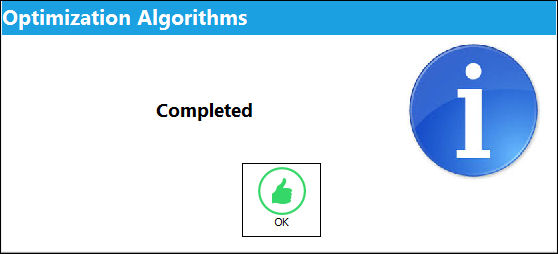
Select this button to run the simulation once all criteria has been selected. The simulation can be done multiple times for optimal results. Once the Optimization is complete, the following information box will appear:
View Recommendations button
Select this button to view all recommended transfer order(s) of parts. If there are too many parts in one location, the system will recommend that the user transfer these parts to other locations. Once a location requires more stock, the user may create a requisition for the part. For additional information regarding the View Recommendations button, refer to the Inventory Optimization (Expendable), Optimization Tab, via Inventory Optimization (Expendable) of the Inventory Training Manual.
_____________________________________________________________________________________
Results:
The following information/options are available in this window:
_____________________________________________________________________________________
Location
The Location for maintenance events, inventory stores, orders, transactions, or training events.
Lead Time
The number of days needed for delivery of the P/N. This value defaults from the Inventory Levels. For additional information refer to the Inventory Levels, General Tab, via the P/N Master of the Settings Training Manual.
Pool checkbox
Select this checkbox to indicate that the P/N is from a Pool facility. This information must be manually entered.
Recommended Assets Qty
The current number of assets in a particular location.
Recommended System Qty
The recommended number of assets that should be in a particular location.
Recommended Adjustments Qty
The recommended number of assets to be adjusted to achieve the Recommended System Qty.
_____________________________________________________________________________________
Share
Print
|
©1997-2026 Trax USA Corp. All rights reserved. This manual may not be copied, photocopied, reproduced, translated, or converted to any electronic or machine-readable form, in whole or in part, without prior written approval from Trax USA Corp. |
 |