
 Share
Share
 Print
Print
|
|
|
|
|


The Automatic Warehouse Message  Button allows users to see the messages being passed between TRAX and the Automated Warehouse system for transactions that have taken place.
The Automated Warehouse functionality is currently customer-specific and relates to an interface with an automated warehouse. This is a system which stores inventory on large shelving systems in bin/boxes which are stored and retrieved by robots. This window is view only and cannot be updated.
 This button is part of the Automated Warehouse capability interface functionality and is only available for customers using this interface. For additional information, refer to your TRAX Interface Administrator.
 This button is security controlled via Inventory/ Query/ Inventory Query. For additional information, refer to the Security Explorer via the System Administration Training Manual.
From the Inventory Query window, select the Automatic Warehouse Message Button.
TRAX displays the Automatic Warehouse Detail window.
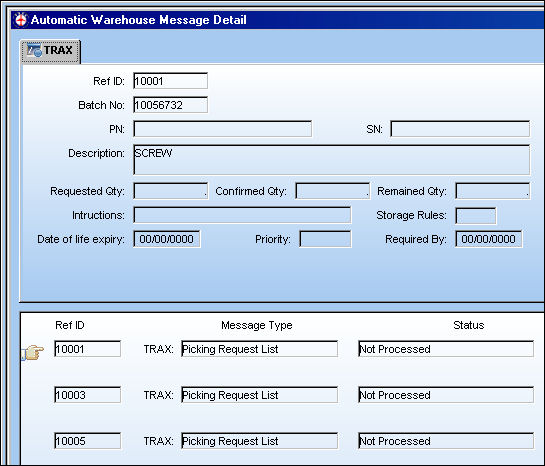
The following information/options are available in this window:
_____________________________________________________________________________________
Ref ID
Sequentially generated reference for the record.
Batch No
The inventory number that is currently associated with a part or group of parts. A part's Batch number can change after various types of transactions take place.
P/N
The Part Number reference for the aircraft part.
S/N
The Serial Number for the specific serialized part.
Description
The description of the part.
Requested Qty
The requested quantity for the purpose of selecting records. The quantity to be stored for the purpose of binning records.
Confirmed Qty
The actual quantity received for the purpose of selecting records. The quantity actually stored for the purpose of binning records.
Remained Qty
The quantity remaining in the Batch for selecting. This pertains to non-serialized component only.
Instructions
Additional instructional information. This is informational only.
Storage Rules
Storage rules as defined in the P/N Master. For additional information, refer to the P/N Master, Inventory tab, via the Settings Training Manual.
Date of Life Expiry
The Shelf Life expiration date for the component.
Priority
The priority of the picklist/requisition. This is for the purpose of selecting records.
Required By
The required date as defined by the picklist/requisition.
_____________________________________________________________________________________
Additional functionality can be utilized through the TRAX Discrepancy  button.
Share
Print
|
©1997-2026 Trax USA Corp. All rights reserved. This manual may not be copied, photocopied, reproduced, translated, or converted to any electronic or machine-readable form, in whole or in part, without prior written approval from Trax USA Corp. |
 |