
 Share
Share
 Print
Print
|
|
|
|
|


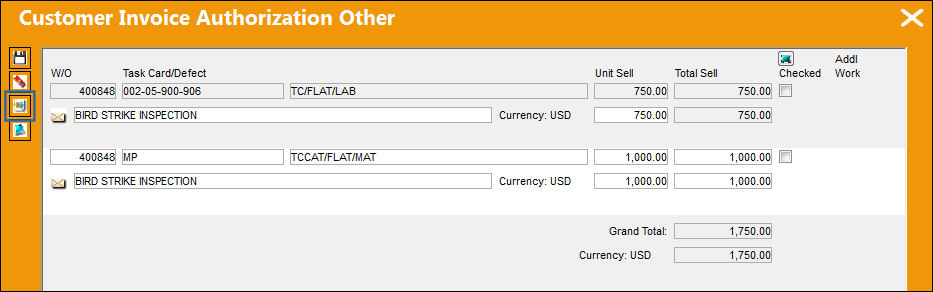
From the Customer Invoice Authorization Other window, the user can access the detail window. From the detail window, the user can update line item information such as the Category, Sell Amount and Description for the Invoice.
The Customer Invoice Authorization Other, Detail window appears.
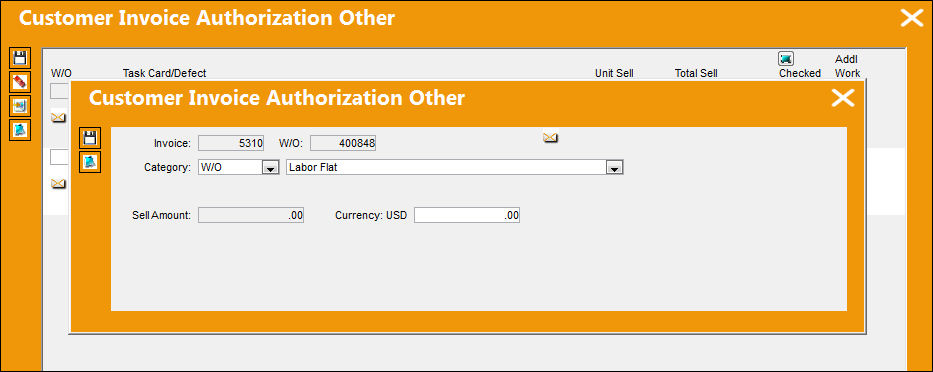
The following information/options are available in this window:
_____________________________________________________________________________________
Invoice
The Invoice requiring authorization.
W/O
The Work Order used to categorize, manage, and schedule work requirements for aircraft maintenance.
Category drop down
Category of contract.
- W/O
- Task Card
- W/O-NR
- NR
Sub Category drop down 
Select from one of the following drop down options.
- Labor Flat
- Labor Surcharge
- Material Flat
- Material Surcharge
- Miscellaneous
- Tax
- Tool
Sell Amount
The local currency that the material or labor (regular hourly rate) are being sold at regardless of the Sell Method being used (i.e. standard, surcharge or flat rate).
Currency
The currency that will be used for the order transaction. Currencies may be defined for the Customer/Vendor in the Customer/Vendor Master and overridden at the order level. For additional information, please refer to the Currency section of the G/L Interface, System Transaction Code Training Manual.
Description
The description of the Customer Invoice Authorization.
_____________________________________________________________________________________
Share
Print
|
©1997-2026 Trax USA Corp. All rights reserved. This manual may not be copied, photocopied, reproduced, translated, or converted to any electronic or machine-readable form, in whole or in part, without prior written approval from Trax USA Corp. |
 |