
 Share
Share
 Print
Print
|
|
|
|
|


Once a dent has been selected and is highlighted in yellow, the user may select the New Damage Chart  button to create a damage chart for the dent.
From the Dent Mapping window, select the New Damage Chart  button.
The Damage & Repair Reporting window appears. Enter all pertinent information then save.
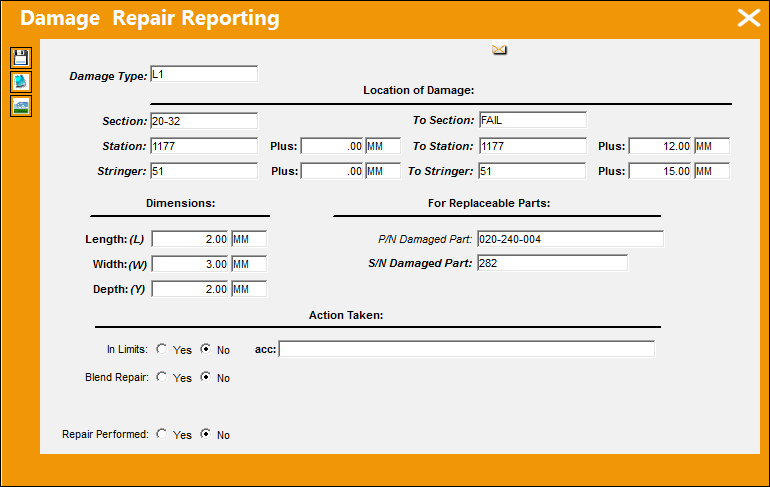
The following information/options are available in this window:
_____________________________________________________________________________________
Damage Type
The Damage Type Code. To view/set up these codes, go to Settings/ Explorer/ System Transaction Codes/ Technical Records/ Damage Type.
_____________________________________________________________________________________
_____________________________________________________________________________________
Section - To Section
The section covering the damage area.
Station - To Station
The station of the aircraft. This is a physical location on the aircraft in inches from a datum point.
Stringer - To Stringer
In aircraft construction, a Stringer (also known as Longeron) is a thin strip of wood or metal, to which the skin of the aircraft is fastened.
Plus
Enter any additional information regarding the station. This is a free text field and is informational only.
_____________________________________________________________________________________
_____________________________________________________________________________________
Length/Width/Depth
The dimension (length, width, depth) of the damaged area.
_____________________________________________________________________________________
_____________________________________________________________________________________
P/N Damage Part
The part number of the damaged part.
S/N Damage Part
The serial number of the damaged part.
_____________________________________________________________________________________
_____________________________________________________________________________________
In Limits Yes/No radio button
Select whether the corrosion is within allowable limits.
Acc (According)
Enter a reference document that the work was completed according to. (e.g. SRN 53-00-0)
Blend Repair Yes/No radio button
Select the Yes radio button if there was any blending done to the repair. Select No if no blending was done to the repair.
If the 'Yes' radio button is selected, the Original Material Thickness, Blend Out Length, Width and Remaining Thickness fields all become mandatory for the save of the record.
Repair Performed radio button
Select the Yes radio button if a repair was performed. Select No if a repair was not performed.
_____________________________________________________________________________________
Share
Print
|
©1997-2026 Trax USA Corp. All rights reserved. This manual may not be copied, photocopied, reproduced, translated, or converted to any electronic or machine-readable form, in whole or in part, without prior written approval from Trax USA Corp. |
 |