
 Share
Share
 Print
Print
|
|
|
|
|


- 4GB of RAM
- Intel Core I5 @ 2.50 GHZ x 2 or equivalent
- 100 GB HDD (Depends on your storage strategy for printed reports)
For information on how to convert the GlassFish server to WildFly, refer to this document:
Trax Programming Support will guide you through the Work Pack Print - Report Server installation. We will provide all required software and will facilitate the installation process via support session or by using a connection such as VPN provided by the customer.
You will need ADMIN privileges to perform all installation/configuration tasks.
Edit the data.source.properties file contained within [installation_folder]\ TraxReportServer\WEB-INF\classes\resources.
Here is the list of properties:
Property |
Description |
Sample Value |
url |
The database connection string. |
oracle:thin:@(DESCRIPTION = (ADDRESS = (PROTOCOL = TCP)(HOST = PROD.traxusers.com)(PORT = 1521)) (CONNECT_DATA = (SERVER = DEDICATED) (SERVICE_NAME = PROD) ) ) |
user |
The database user. |
odb |
password |
The database password. |
odb |
profile |
The TRAX company profile for the Report Server to use. |
TRAX |
trax.user |
The TRAX user name for the Report Server GUI to impersonate. |
ADM |
trax.dir |
Path to the installation resources folder. |
[installation_folder]\\ TraxReportServer\\WEB-INF\\classes\\resources |
print.dir |
Temp local folder for the Report Server to generate the report’s pdfs. |
C:\\workpackprint |
print.dir.final |
Location to place the completed report’s pdf. This should be a network location that all TRAX computers will access This location should be a network location that all TRAX computers will access. |
\\\\2K3DC01\\TRAX_Backups\workpackprint |
antennaHousePath |
The path to the antenna house configuration XML. |
C:\\Program Files\\AntennaHouse\\AHFormatterV63\\AHFSettings(x64).xml |
parallelism.level |
Number of thread the Report Server will use in order to complete a print job. To be used carefully. |
10 |
prints.per.thread |
Number of prints that each thread will handle. |
1 |
max.prints |
Maximum number of print jobs that can run at a time |
1 |
add.tc/pack.pages |
This is a customized property and must be set to false. |
false |
rtf2foHome |
The path to the RTF2FO plug in that will convert imaged to jpg the same way the TRAX application does. |
C:\\Trax\\Ocx\\RTF2FO\\img2png.exe |
deleteTemp |
This property controls the TEMP files and folders generated by the report server. If you want the files to be deleted after each print, set this to "on". Otherwise set to "off". In the testing process, it is recommended to have this set to "off". |
off |
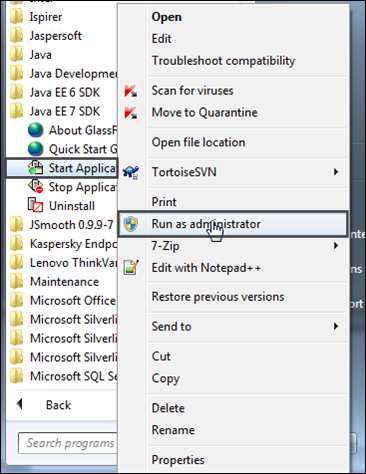
To start the server, right-click on 'Start Application' then select 'Run as administrator.'
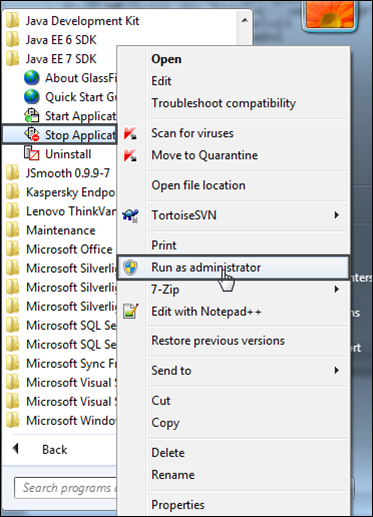
To stop the server, right-click on 'Stop Application' then select 'Run as administrator.'
Share
Print
|
©1997-2026 Trax USA Corp. All rights reserved. This manual may not be copied, photocopied, reproduced, translated, or converted to any electronic or machine-readable form, in whole or in part, without prior written approval from Trax USA Corp. |
 |