
 Share
Share
 Print
Print
|
|
|
|
|


Run P/N Re-Order Level Detail Selection
Inventory/ Update/ P/N Reorder Level/ Detail
Run the P/N Re-Order Level/Detail selection. The ‘P/N Re-Order Level Suggestion Print’ is created by the system when the Find  button is selected.
Note: Verify that all P/Ns to be set up with a system generated re-order level, have the Poisson Factor transaction code and Lead Days set up.
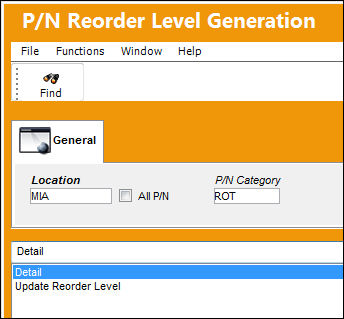
The report contains a suggested summary of the Re-Order Level (quantities) for the selected location.
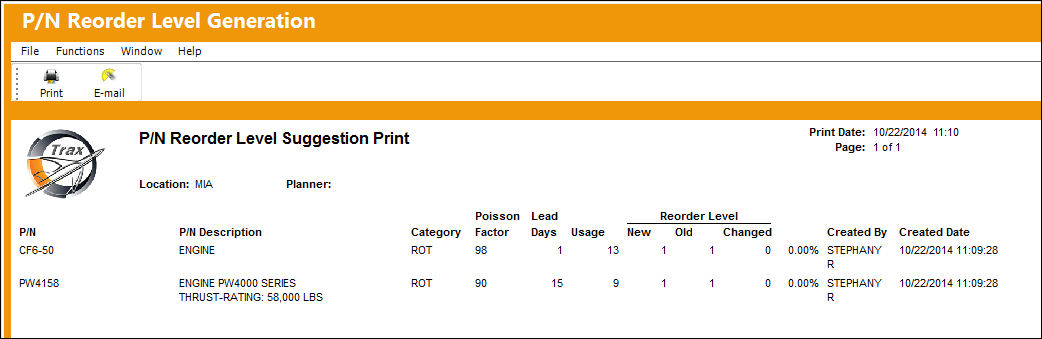
Notice that the system provides a new re-order level based on the re-order formula, if this new value is different from the old re-order value, then the Changed column will display the difference.
For information on how the re-order level is calculated, refer to the section, About Re-Order Levels.
Share
Print
|
©1997-2026 Trax USA Corp. All rights reserved. This manual may not be copied, photocopied, reproduced, translated, or converted to any electronic or machine-readable form, in whole or in part, without prior written approval from Trax USA Corp. |
 |