
 Share
Share
 Print
Print
|
|
|
|
|


Engineering Control, Vendor Restrictions Tab
The Vendor Restriction tab allows users to specify the Vendors that can be utilized for Repair Orders that contain the currently selected P/N E/C. This tab is not applicable to A/C E/Cs. If there are no vendors specified, then all vendors can be utilized to repair the P/N E/C.
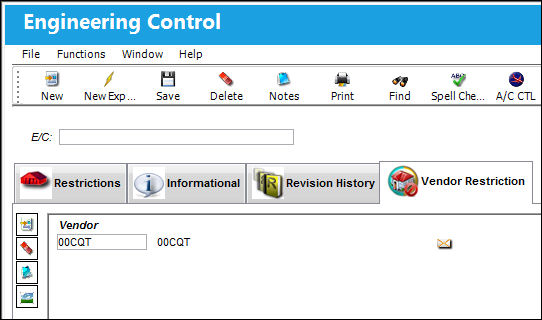
The following information/options are available in this window:
_____________________________________________________________________________________
Vendor
The Vendor allowed to utilize a Repair Order containing the selected P/N E/C. If no vendor is specified, then there are no Vendor restrictions, and all vendors can be utilized to repair the P/N E/C. Vendors are set up in the Vendor Master in Settings/ Update/ Vendor.
_____________________________________________________________________________________
Select the Notes  button to add notes to the Vendor Restriction tab.
Select the Image  button to add images to the Vendor Restriction tab upon the E/C being printed.
Share
Print
|
©1997-2026 Trax USA Corp. All rights reserved. This manual may not be copied, photocopied, reproduced, translated, or converted to any electronic or machine-readable form, in whole or in part, without prior written approval from Trax USA Corp. |
 |