
 Share
Share
 Print
Print
|
|
|
|
|


Engineering Control
The Engineering Control (E/C) option allows users to configure the controls and requirements associated with aircraft and parts within the system. Additional controls are used along with the basic E/C configuration, which are described later.
E/Cs are effective either to aircraft or components (parts). Airworthiness Directive (AD) and Service Bulletin (SB) status can be tracked for aircraft by using E/Cs. Component related P/N E/Cs can be tracked as well, with the additional capability to specify hard time limitations. These items can then appear in the Planning Query for scheduling.
Task Card requirements can be linked to the E/C. The Task Cards are then added to the Work Orders (along with the E/C) in the Production module or via the A/C Planning Query in the Planning module.
When the Task Cards are completed under the Work Order, this then allows the E/C status to be updated (when the Work Order is closed). Compliance records are also written.
The critical items for the control of the E/C are the schedule and the effectivity. There are numerous combinations of ways to configure E/Cs and relative information. Please consider additional support regarding this matter if necessary.
The E/Cs may require authorization. One step authorization or complex authorization processes may be set up. Please refer to the E/C Authorization section for additional information.
The following tabs and buttons are available:
Engineering Control Tabs |
Engineering Control Buttons |
|---|---|
Document Multi buttons |
 New button

 Save button
 Delete button

 Find button
 Spell Check button


This update window is also available in query mode where users can view the records provided in this window but cannot create new records or edit existing data. Refer to this module's Query menu.
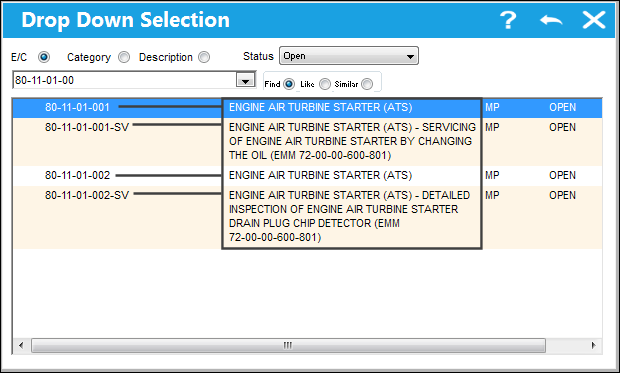
 Full E/C Description Displayed in Selection Pop-up
When right-clicking in the E/C field to select an E/C, the E/C's Description is displayed in its entirety in the drop down selection window. This will help the user by providing more information on the E/C before making a selection.
Share
Print
|
©1997-2026 Trax USA Corp. All rights reserved. This manual may not be copied, photocopied, reproduced, translated, or converted to any electronic or machine-readable form, in whole or in part, without prior written approval from Trax USA Corp. |
 |