
 Share
Share
 Print
Print
|
|
|
|
|


There are two types of E/C compliances: A/C E/C compliance and P/N E/C compliance. Select the Compliance  button to view a history of compliance records associated with an E/C. When the E/C is accomplished on a Work Order (Production or Shop) or Repair Order, a record of the E/C compliance for all tail numbers or part serial numbers will be kept in this window.
 The Engineering Compliance window has been updated and is now organized by A/C Compliance and A/C, P/N Compliance and P/N. This is useful for more efficient data gathering. This is a view only window and the information in this window cannot be edited or updated in this window.
The user also has the option to select the Select  button and view in Query Mode the details of the actual Work Order or Repair Order which the E/C was complied on. For additional information, refer to the Compliance Button, via Engineering Compliance of the Engineering Training Manual.
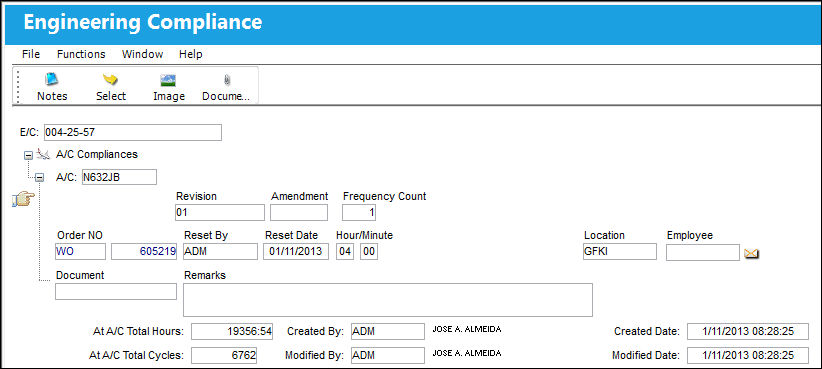
The following information/options are available in this window:
_____________________________________________________________________________________
Revision
The Revision of the E/C at the time of compliance.
Amendment
The Amendment of the E/C at the time of compliance.
Frequency Count
Displays at which frequency the E/C was complied on (out of the E/Cs total frequency, as defined in the E/C Schedule tab).
Order NO
The relevant Repair or Work Order Number the E/C was complied against.
Reset By
The user that accomplished the Work Order Closing (Production or Shop), receiving of the Repair Order, completion of Receiving Inspection, or Manual Compliance.
Reset Date
The date the E/C was complied with.
Reset Hours/Minutes
The time this E/C was complied with.
Location
The location the E/C was complied at.
Employee
The Employee field will only be populated if the compliance record has been edited and an employee has manually been populated.
Document
The Document information entered in Manual Compliance.
Remarks
This field is used to enter any additional information regarding the compliance event. This is a free text field.
At A/C Total Hours
The total number of flight hours at the time of compliance.
At A/C Total Cycles
The total number of flight cycles at the time of compliance.
Created By
The user who created the record.
Created Date
The date the record was created.
Modified By
The user who last modified the record.
Modified Date
The date the record was last modified.
_____________________________________________________________________________________
Other buttons offered in the Engineering Compliance, via Engineering Control include the following:
Share
Print
|
©1997-2026 Trax USA Corp. All rights reserved. This manual may not be copied, photocopied, reproduced, translated, or converted to any electronic or machine-readable form, in whole or in part, without prior written approval from Trax USA Corp. |
 |