
 Share
Share
 Print
Print
|
|
|
|
|


System Notification Creation
The TRAX System Notification feature allows the TRAX Administrator to define who will receive messaging based on transactions which occur within TRAX. This can be done through the System Notification Master or through the Notification  button, found in certain System Transaction Codes or other windows.
For more information regarding which System Transaction Codes the Notification can be utilized in, refer to the Transaction Code Notification By Module.
The following is the basic life cycle of the System Notification Creation, particularly the creation of the Notification for an individual recipient:
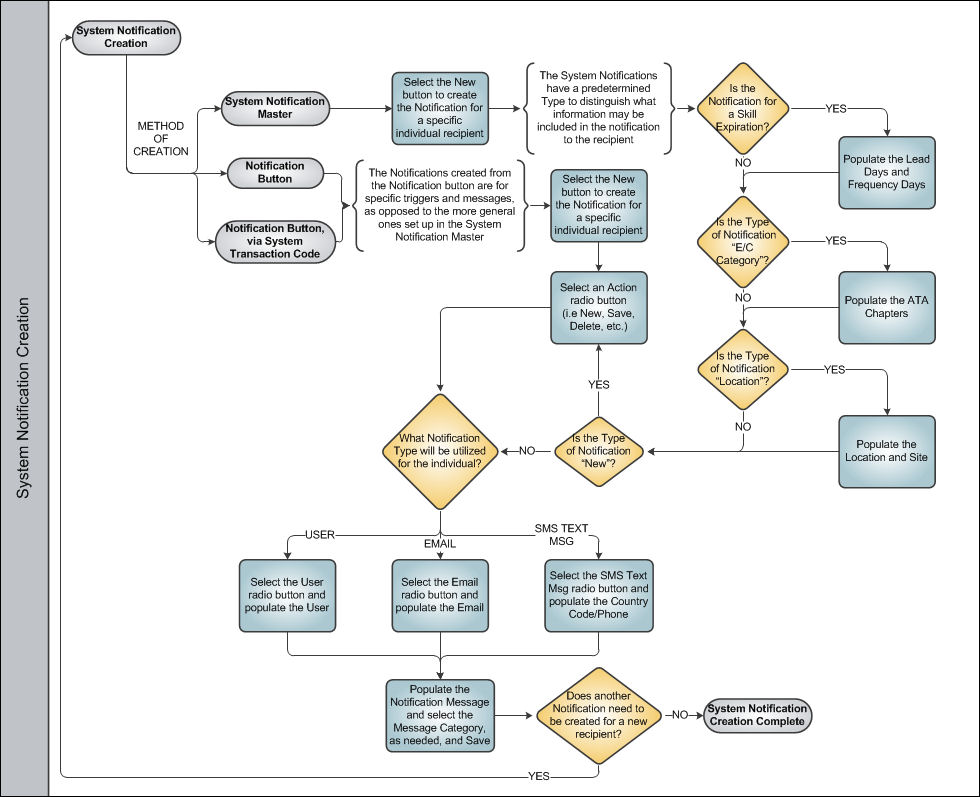
Upon the completion of creating the Notification for an individual recipient, the process can be repeated, as necessary, for additional recipients. Once this utilization is completed, the System Notification Creation Process is complete.
Share
Print
|
©1997-2026 Trax USA Corp. All rights reserved. This manual may not be copied, photocopied, reproduced, translated, or converted to any electronic or machine-readable form, in whole or in part, without prior written approval from Trax USA Corp. |
 |