
 Share
Share
 Print
Print
|
|
|
|
|


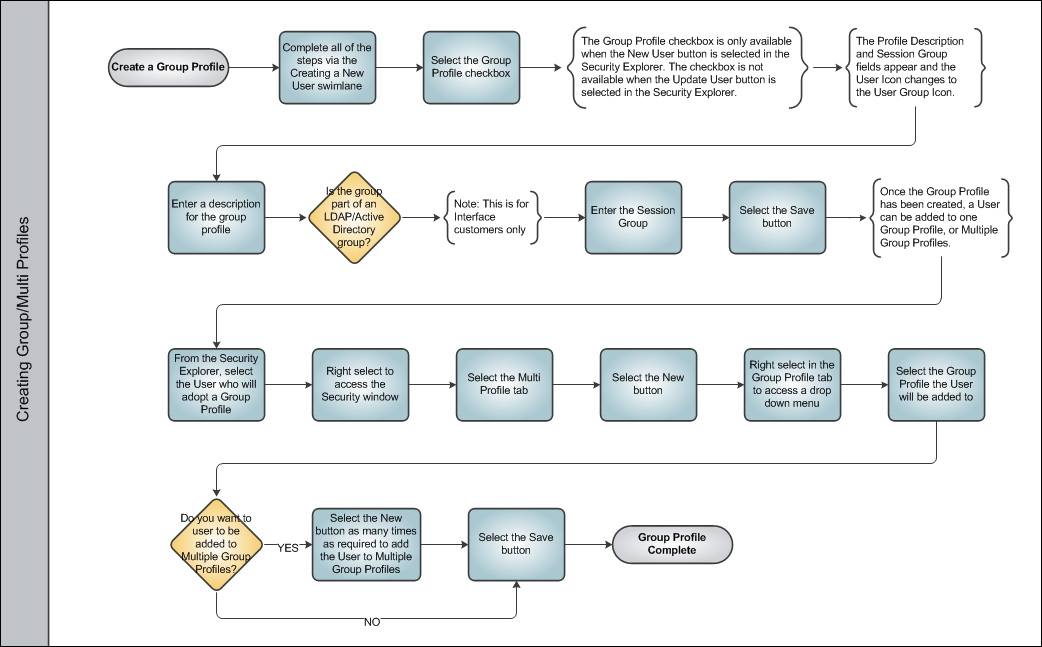
Creating Group/Multi Profiles
Group Profiles in TRAX are an effective way of granting security access to groups depending on the common user needs of the group members. Once a Group Profile is created, the group's security settings can be applied to individual users by entering a Group Profile in the Adopt Group Profile field of the Security, General tab.
Once a Group Profile has been established, the TRAX Administrator can then create Multi Profiles by adding individual users to multiple Group Profiles.
Share
Print
|
©1997-2026 Trax USA Corp. All rights reserved. This manual may not be copied, photocopied, reproduced, translated, or converted to any electronic or machine-readable form, in whole or in part, without prior written approval from Trax USA Corp. |
 |