
 Share
Share
 Print
Print
|
|
|
|
|


Helicopter Setup and Configuration
Before utilizing the Helicopter functionality in the system, administrators must set up the configuration and create the necessary components.
The following is the basic life cycle of the Helicopter Aircraft Integration, particularly the setup and configuration:
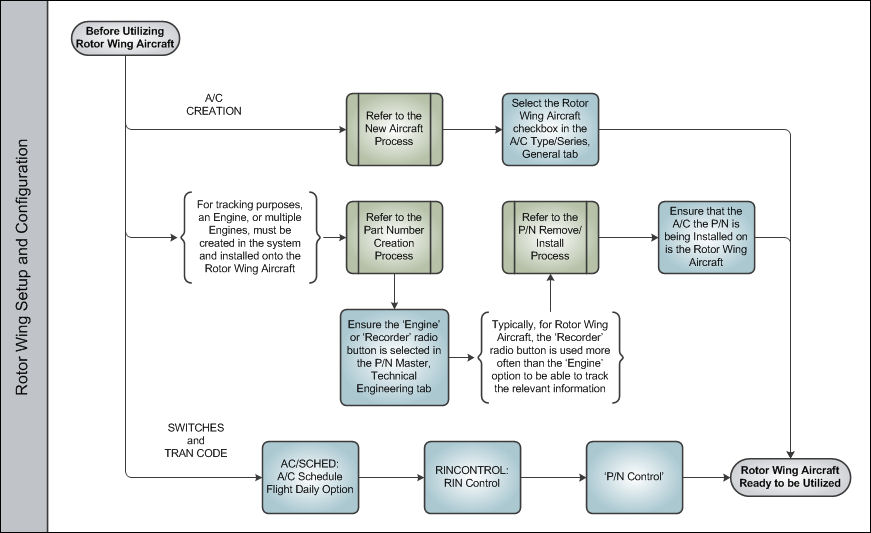
- Aircraft must first be designated as Rotor Wing via the A/C Type-Series. For more information, refer to the New Aircraft Process.
- For tracking purposes, an Engine, or multiple Engines, must be created in the system and installed onto the Helicopter Aircraft.
- Ensure the 'Engine' or 'Recorder' radio button is selected in the P/N Master, Technical Engineering tab during the Part Number Creation Process.
Note: Typically, for helicopter, the 'Recorder' radio button is used more often than the 'Engine' option to be able to track the relevant information.
- Ensure that the aircraft the P/N is Installed on is Rotor Wing Aircraft during the P/N Remove/Install Process.
- Ensure the 'Engine' or 'Recorder' radio button is selected in the P/N Master, Technical Engineering tab during the Part Number Creation Process.
- The listed switches configure some of the most broad features that affect Helicopter Integration. For more information, refer to the following switches:
- The following Transaction Code in particular must be set up for the Rotor Wing Aircraft Integration:
Note: Other Switches and Transaction Codes that affect Helicopter Integration will be mentioned throughout this process. For more information on all available switches and transaction codes, refer to the Technical Records Switches Manual and/or Technical Records Transaction Codes Manual.
Once all of these configurations have been set up, users can begin the Tracking Helicopter Flights.
Share
Print
|
©1997-2026 Trax USA Corp. All rights reserved. This manual may not be copied, photocopied, reproduced, translated, or converted to any electronic or machine-readable form, in whole or in part, without prior written approval from Trax USA Corp. |
 |