
 Share
 Print
|
|
|
|
|


Requisition Management, General Tab
The General tab allows users to search for Requisitions through primary Requisition details (like Requisition Number, Location, etc.).
As with the majority of the query selections on the system, it is best practice to input as many parameters as possible to minimize your search result. Select the Find  button to display the search results. The Results are displayed below the Query fields:
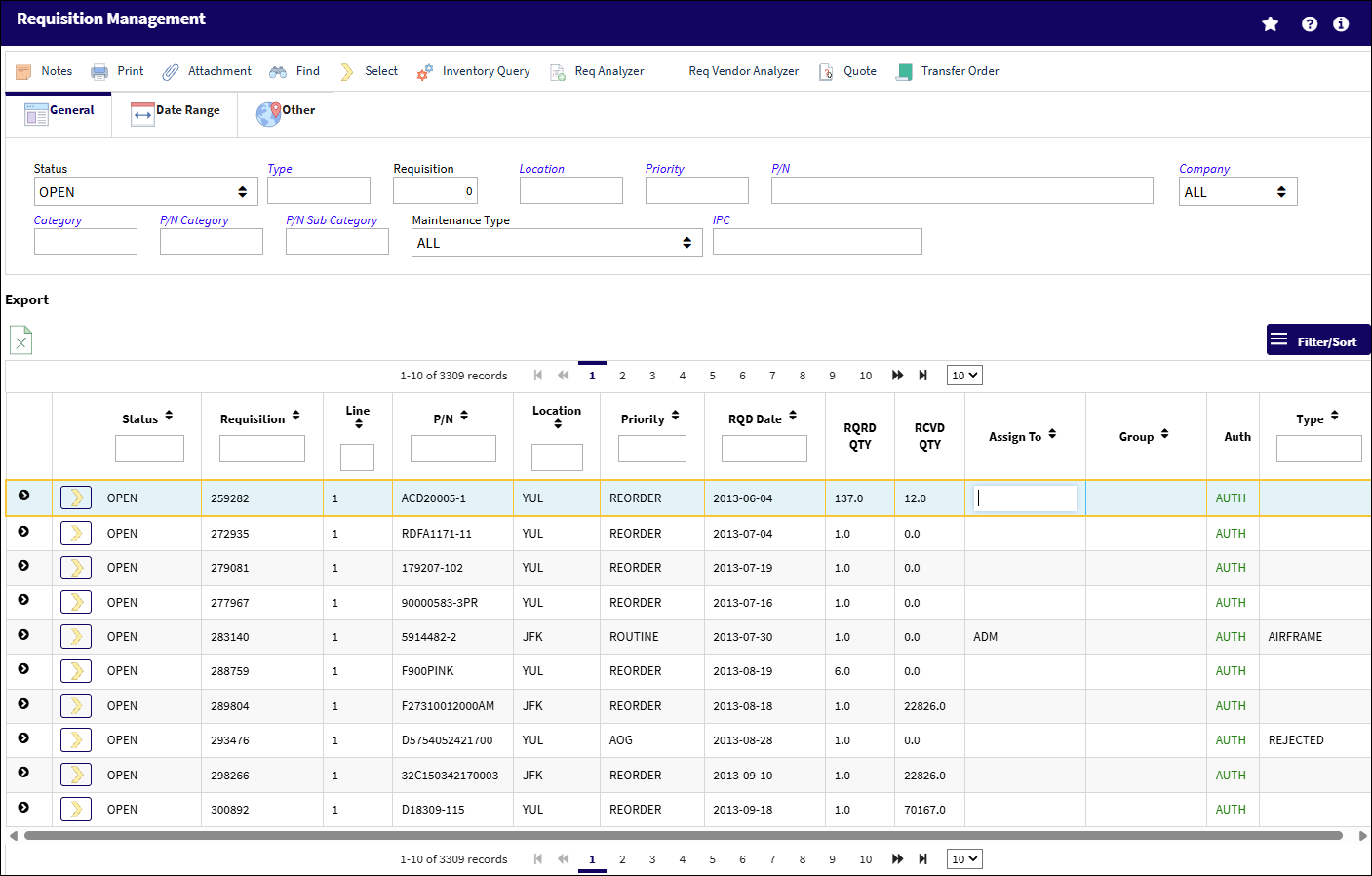
 Note: The Results section auto-expands records to display additional details.
Note: The Save  button has been removed from this window. Changes made to editable fields (Assign To and Group) are automatically saved once a selection is made and the user clicks outside the field.
 Note: The Type field also auto-saves the selected type when the user clicks outside the field.
Query
The following information/options are available in this window:
_____________________________________________________________________________________
Status drop down
The status of the Requisition. Open is set as the default.
Open - Requisition is open.
Closed - Requisition has been closed.
All - All Requisition statuses.
Order - A Requisition based on an Order.
Cancel - Requisition that has been canceled.
Type
The type of Requisition used to identify the purpose of the request. The requisition type is also useful for sort, filters and searches in the system. A default requisition type may be configured. These are defined in the Requisition Type System Transaction Code.
Requisition
List of required parts for either a maintenance item or for restocking.
Location
The Location for maintenance events, inventory stores, orders, transactions, or training events.
Priority
Identify the urgency of the request or requisition. Additionally, notification based on the requisition priority may be defined by location. These codes are defined in the Priority System Transaction Codes.
P/N
The Part Number reference for the aircraft part.
Company
The G/L Company that the P/N was assigned to when entered into inventory or ordered.
Category
The Category of the Requisition.
P/N Category
The category of the part as defined in Settings/ Explorer/ System Transaction Code Explorer/ Settings/ P/N Category (e.g. Rotable, Consumable, Repairable) and entered for the particular part in the P/N Master.
P/N Sub Category
The Sub Category for each part.
Maintenance/Inventory Type drop down
The type of inventory the item is registered as in the system. The available options are All, General, GSE and Maintenance Inventory. All is set as the default.
IPC
Illustrated Part Catalog reference that manufacturers use to illustrate specific parts by sections of the aircraft.
Material Request Status drop down
The status of the Material Request. The available Material Request Statuses that can appear in this field are as follows:
- Available
- Canceled by Customer
- Canceled by LHT (supplier)
- Delivery Confirmed
- Delivery in Progress
- Preparing for Shipment
- Processing Request
- Request Accepted
- Request Completed
- Request Received
 Note: This drop down is part of the Material Integration functionality. For more information refer to the Material Integration Functionality documentation excerpt and consult your interface administrator.
_____________________________________________________________________________________
Results
The following information/options are available in this window:
_____________________________________________________________________________________
Export as Excel  button
The Export as Excel button can be selected to view the queried data (including all pages) in an Excel spreadsheet. This Excel file can be saved for later use. For more information refer to the Export as Excel Button via the eMRO System Standards manual.
Filter/Sort button
The Filter/Sort  button is used to alter the search criteria for records associated with the host module and window. For more information, refer to Filter/Sort Button via the eMRO System Standards Module.
Status
The status of the Requisition.
Note: The status is automatically updated when a requisition is placed on a PO (i.e. from Open to Order).
Requisition
List of required parts for either a maintenance item or for restocking.
Requisition Line
The line item number for the specific Requisition.
P/N
The Part Number reference for the aircraft part.
Location
The required delivery location.
Priority
Identify the urgency of the request or requisition. Additionally, notification based on the requisition priority may be defined by location.
RQD Date
The date that the item(s) is/are required by.
RQRD QTY
The quantity of items/parts required.
Note: This value is automatically updated when the QTY has been updated via the Requisition Detail, General tab and also when the requisition has been placed on a PO.
ORD QTY
The number of parts for the transaction.
Note: This value is automatically updated when the QTY has been updated via the Requisition Detail, General tab and also when the requisition has been placed on a PO.
RCVD QTY
The quantity of parts that were received.
Assign To
The employee (buyer) that this Requisition is assigned to. This can only be edited on ‘Open’ Requisitions. This field is auto populated with the value that appears via Settings/ Update/ P/N/ Inventory Levels button/ General Tab/ Buyer field. The Assign To Buyer is populated if the part has been previously set up with an assigned buyer. An assigned buyer is defined via Settings/ Update/ P/N/ Inventory Levels button/ General Tab/ Buyer field.
Note: Only users who are set up with an Order Authorization amount appear in this drop down selection. For additional information, refer to the Authorization section of the Settings Training Manual.
Note: The user can save a requisition without having this field populated. The drop down view changes depending on the setting of Switch  ASIGNTOSYSTRANCODE. For additional information, refer to Switch ASIGNTOSYSTRANCODE via the Requisition Switches Manual.
Note: The Assign To field displays selection options based on the letters typed. Once a selection is made and the user exits the field, the choice is automatically saved. The Assign To field can only be changed once from the Requisition Management window. If further changes are needed, open the record and edit it from the Requisition Management Detail window.
Group
The Group responsible for buying this part.
Note: The Group field displays selection options based on the letters typed. Once a selection is made and the user exits the field, the choice is automatically saved. The Group field can only be changed once from the Requisition Management window. If further changes are needed, open the record and edit it from the Requisition Management Detail window.
Auth
The authorization status of the requisition (e.g., Auth, RQR Auth).
Auth - Records that have been authorized display the 'Auth' text.
RQR AUTH - Records with a red warning message saying 'RQR AUTH' require authorization.
Type
The type of Requisition used to identify the purpose of the request. The requisition type is also useful for sort, filters and searches in the system. A default requisition type may be configured.
Note: The Type field displays selection options based on the letters typed. Once a selection is made and the user exits the field, the choice is automatically saved.
Expand  button
Select the Expand button to view additional details.
P/N Description - The description of the part.
A/C - The individual aircraft tail number.
W/O - The Work Order used to categorize, manage, and schedule work requirements for aircraft maintenance.
Task Card - The Task Card / Job Card that details the scheduled maintenance work.
Defect Type - The type of defect found on the aircraft (for example, Pilot Report, MX Report).
Defect - The defect number (or log book number).
Defect Item - The defect log item number.
E/C - The Engineering Control that specifies aircraft or component scheduled maintenance intervals.
Preferred VND - The preferred vendor to acquire the parts from (if applicable).
ATA - The Air Transport Association Chapter, Section and Paragraph numbers associated to the Requisition
REQ Description - Optional description about the requisition.
UOM - The Unit of Measurement for the part(s) required.
Company - The G/L Company that the P/N was assigned to when entered into inventory or ordered.
Inventory Type - The type of inventory the item is registered as in the system. The available options are All, General, GSE and Maintenance Inventory. All is set as the default.
Category - The Category of the Requisition.
Created By - The user who created the record.
_____________________________________________________________________________________
Select the results to access the Requisition Management detail window. From there users are allowed to fulfill requisitions by manually referencing multiple orders and order types. For more information refer to the Requisition Management Detail.
Note: Requisitions created for parts and their preferred vendors that are under contract contain the word  listed in the Requisition Management listing. For more information refer to the Vendor Cost Listing Button via the Settings Training Manual.
Share
Print
|
©1997-2026 Trax USA Corp. All rights reserved. This manual may not be copied, photocopied, reproduced, translated, or converted to any electronic or machine-readable form, in whole or in part, without prior written approval from Trax USA Corp. |
 |