
 Share
 Print
|
|
|
|
|


Effectivity Button, via Formulas

Select the Effectivity  button to apply Formula Effectivity to the aircraft selected in the Formula window. This will ensure that an A/C has the proper formula configurations applied.
Note: When the switch  FF-AC is set to Yes, the system will display the Effectivity button in the Formulas window, the Formulas CTL button in the Schedule tab via the Engineering Control Detail, the Formulas CTL button in the Engineering Effectivity Override window, and the Formulas tab in the A/C Actual Flights window.
When the button is selected, the Formulas Effectivity appears as follows. Click the select checkbox to apply effectivity to a specific aircraft.
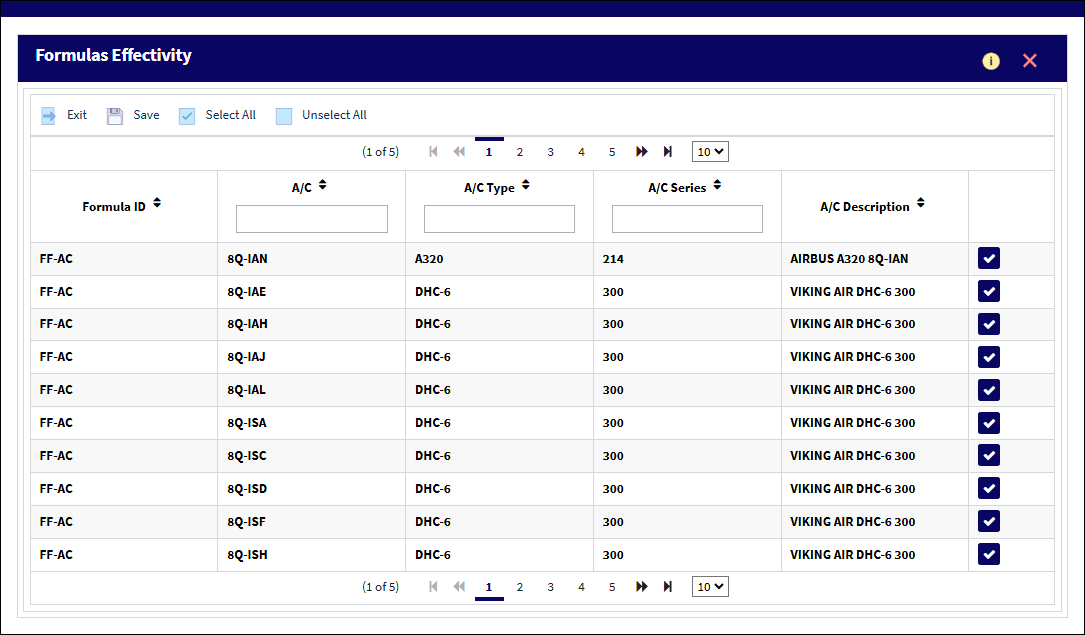
The following information/options are available in this window:
_____________________________________________________________________________________
Exit  button
Select the Exit button to close the Formulas Effectivity window.
Save  button
Select the Save button to save the changes to the Formulas Effectivity window.
Select All  / Deselect All
 button
Use these buttons to select all or to deselect all aircraft.
Select A/C checkbox
Select this checkbox to only add effectivity to the selected aircraft.
_____________________________________________________________________________________
Share
Print
|
©1997-2026 Trax USA Corp. All rights reserved. This manual may not be copied, photocopied, reproduced, translated, or converted to any electronic or machine-readable form, in whole or in part, without prior written approval from Trax USA Corp. |
 |