 Download Online Help
 Print
|
|
|
|
|


The Lower Level and Override (Ovr) checkboxes are available with the Called On and Called On At options.
The user may only select one of the two checkboxes. They are described as follows:
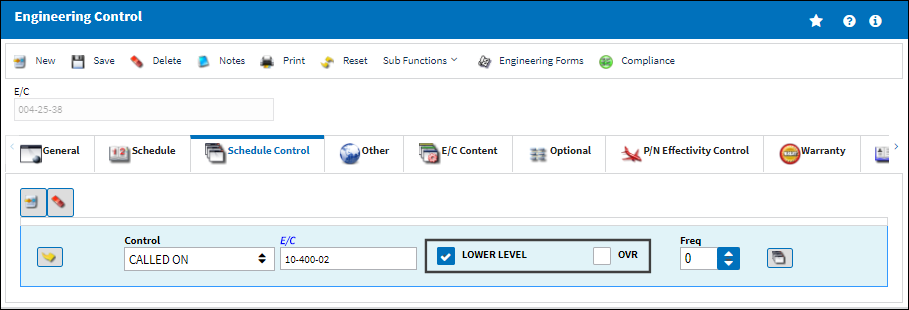
The following options/information is available in this window:
_________________________________________________________________________
Lower Level checkbox
When this checkbox is selected, the system assumes that all lower level Task Card steps associated to a Child E/C are contained in the Parent E/Cs Task Cards. This feature is helpful when a Parent E/C includes tasks that are identical to tasks on the original or Child E/C. An engineering decision must be made to verify if the Parent E/Cs Task Cards contain the same steps of the Child E/C. No Task cards from the Child E/C will be added to the Work Order AT ALL.
 Do not select this checkbox if you want the Task Cards to follow the Child E/C.
Note: When Switch  MANLLOR is set to Yes, and the E/C is classified as 'Mandatory', the Lower Level and Override checkboxes will be disabled.
Ovr checkbox (Override checkbox)
If selected, the system will verify if there is at least one compliance record that has been written for the original E/C related to the A/C (tail number) on the Work Order. If at least one compliance record exists, the system will not bring in the Task Cards of the original E/C. If a compliance record does not exist, the system will bring in the Task Cards (of the original E/C) for one time only and from that point forward, will not.
Note: When Switch MANLLOR is set to Yes, and the E/C is classified as 'Mandatory', the Lower Level and Override checkboxes will be disabled.
This checkbox is a customized request and the use of it is not recommended for most customers.
_________________________________________________________________________
Download Online Help
Print
|
©1997-2018 Trax USA Corp. All rights reserved. This manual may not be copied, photocopied, reproduced, translated, or converted to any electronic or machine-readable form, in whole or in part, without prior written approval from Trax USA Corp. |
 |