 Download Online Help
 Print
|
|
|
|
|


When a Child E/C is to be called on one time only at a specified frequency on the parent E/C, the Called On First option should be used. The original E/C will be performed one time only, on the frequency specified in the Start At field of the Called On First E/C.
Note: The Child/ Dependent E/Cs interval should always match the interval of the Parent E/Cs schedule. For example, if the Parent E/C is scheduled by 500 hours or 185 days, then the Child/ Dependent E/Cs schedule should match. Additionally, we recommend that the Plan E/C checkbox, via the Engineering Control, Schedule tab remains selected for the Child/ Dependent E/C to allow for Planning to observe the E/C.
The following example shows the Called On 1st option being utilized in the Engineering Control, Schedule Control tab, but has the same functionality for the Engineering Control, Schedule Controlled By tab.
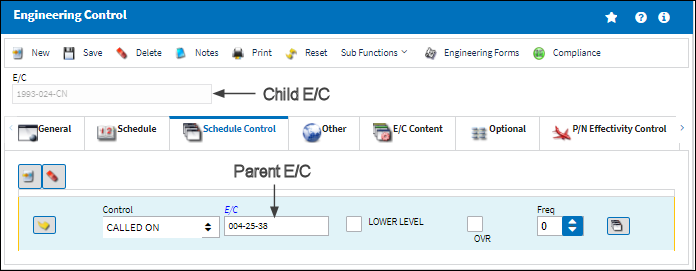
The following options/information is available in this window:
_________________________________________________________________________
Start At
The number specified in the Start At field will instruct the system to initiate the original E/C on the Control E/C's occurrence. Please note that this is not a Frequency number.
Note: The Called On First E/Cs total number of frequencies is specified in the Total Frequency field of its Schedule Tab.
_________________________________________________________________________
In this example, the original E/C will start at the 3rd occurrence (Start At field) of the Called On First E/C (after the completion of the Called On First E/Cs 2nd frequency, which has 7 total frequencies). Since the Start At number represents an occurrence, not a Frequency number, the Start At number can be greater than the Total Frequency number of the Called On First E/C.
When the Called On First E/C is attached to the Work Order, the original E/C is also attached to the Work Order when the occurrence matches the Start At number.. It is attached one time only, to the Work Order that is created for the corresponding Start At number. This function can be used independently, or with the Called On Repeat option.
Note: The user may utilize the Called On First option with an unlimited number of E/Cs.
Download Online Help
Print
|
©1997-2018 Trax USA Corp. All rights reserved. This manual may not be copied, photocopied, reproduced, translated, or converted to any electronic or machine-readable form, in whole or in part, without prior written approval from Trax USA Corp. |
 |