 Download Online Help
 Print
|
|
|
|
|


The Schedule Control tab lists all of the E/Cs that call on the currently selected E/C. If the currently selected E/C appears on the Schedule Controlled By tab of another E/C, based on a Called On relationship (or Called On At, Called On 1st, etc.), then that E/C will be listed here. For additional information, refer to the topic About the Original E/C's Dependence on the Called On E/C.
Note: The Schedule Control Tab is the preferred method of creating complex relationships between E/Cs and their scheduling. This Tab works in conjunction with the Total Frequency field, which appears on the Schedule Tab of an E/C.
To create a new 'Called On' option for an E/C, first the user must select the Schedule Control Tab and then select the New  button to create a Called On option.
Note: Security must be enabled for the user to view the New button and the Delete  button in the Engineering Control window.
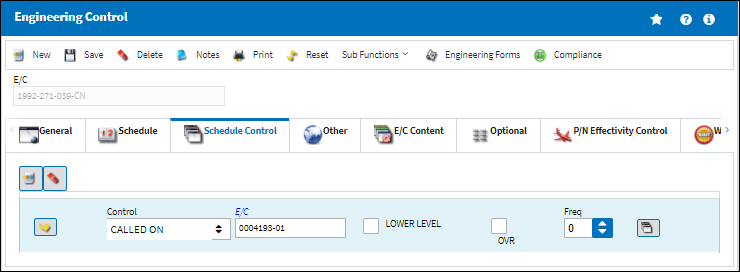
The following options/information is available in this window:
_________________________________________________________________________
Called On  button
The E/C that the current E/C is calling on for it's schedule. Select this to view all Called On E/Cs for the Parent E/C.
E/C
Shows the Parent E/C the user is linking to the Child E/C. This E/C's information can be viewed by selecting it.
Note: The Child/ Dependent E/Cs interval should always match the interval of the Parent E/Cs schedule. For example, if the Parent E/C is scheduled by 500 hours or 185 days, then the Child/ Dependent E/Cs schedule should match. Additionally, we recommend that the Plan E/C checkbox, via the Engineering Control, Schedule tab remains selected for the Child/ Dependent E/C to allow for Planning to observe the E/C.
Control
The user can apply any combination of these options to an unlimited number of E/Cs. These options will be discussed in greater detail in the ensuing sections.
Called On - The user may choose the Called On option if they would like to have the Original E/C performed in conjunction with a Called On E/C. When the Called On E/C is attached to the Work Order, the original E/C is also attached to the Work Order automatically (recalled onto the Work Order). Manual Compliance of a P/N E/C will automatically write compliance for its associated Called On E/C. For additional information, refer to Called On, via Engineering Control Schedule Control Tabs via the Engineering - E/C Training Manual.
Called On 1st - The user may choose the Called On 1st option for the selected E/C to be called on one time only at a specified frequency of the Parent E/C. The original E/C will be performed one time only, on the frequency specified in the Start At field of the Called On First E/C. For additional information, refer to Called On 1st, via Engineering Control Schedule Control Tabs via the Engineering - E/C Training Manual.
Called On At - The user may choose the Called On At option to allow for a more flexible scheduling of the E/Cs to specify what frequency the selected E/C is to be accomplished on an interval basis in relation to the Parent E/C. For additional information, refer to Called On At, via Engineering Control Schedule Control Tabs via the Engineering - E/C Training Manual.
Called On Repeat - The user may choose the Called On Repeat option to set a frequency for the Called On 1st E/C. For additional information, refer to Called On Repeat, via Engineering Control Schedule Control Tabs via the Engineering - E/C Training Manual.
E/C To Be Activated - The user may choose the E/C To Be Activated option to set the selected E/C to be activated upon the compliance of the Parent E/C. For additional information, refer to E/C To Be Activated, via Engineering Control Schedule Control Tabs via the Engineering - E/C Training Manual.
E/C To Be Terminated - The user may choose the E/C To Be Terminated option to set the selected E/C to be terminated upon the compliance of the Parent E/C. For additional information, refer to E/C To Be Terminated, via Engineering Control Schedule Control Tabs via the Engineering - E/C Training Manual.
Note: When the status of the E/C is Open, or Applicable/ Not Embody, and compliance is manually written, the functionality of termination will still occur.
Terminate E/C If Terminated - The 'Terminated E/C if Terminated' function is a useful tool to prevent identical maintenance events from being carried out twice. For additional information, refer to Terminated E/C If Terminated, via Engineering Control Schedule Control Tabs via the Engineering - E/C Training Manual.
Lower Level checkbox
When this checkbox is selected, the system assumes that all lower level Task Card steps associated to a Child E/C are contained in the Parent E/Cs Task Cards. This feature is helpful when a Parent E/C includes tasks that are identical to tasks on the original or Child E/C. An engineering decision must be made to verify if the Parent E/Cs Task Cards contain the same steps of the Child E/C. No Task cards from the Child E/C will be added to the Work Order AT ALL.
 Do not select this checkbox if you want the Task Cards to follow the Child E/C.
Note: When Switch  MANLLOR is set to Yes, and the E/C is classified as 'Mandatory', the Lower Level and Override checkboxes will be disabled.
Ovr checkbox (Override checkbox)
If selected, the system will verify if there is at least one compliance record that has been written for the original E/C related to the A/C (tail number) on the Work Order. If at least one compliance record exists, the system will not bring in the Task Cards of the original E/C. If a compliance record does not exist, the system will bring in the Task Cards (of the original E/C) for one time only and from that point forward, will not.
Note: When Switch MANLLOR is set to Yes, and the E/C is classified as 'Mandatory', the Lower Level and Override checkboxes will be disabled.
This checkbox is a customized request and the use of it is not recommended for most customers.
Frequency
If the original E/C is to be performed on an interval basis, use the Frequency Field. For example, if the Frequency is set to 02, then every 2nd time that the Parent E/C is attached to a Work Order, the Called On, or Child E/C, is also automatically brought onto the Work Order as well.
_________________________________________________________________________
Select the Delete button to delete a Called On.
Note: If the user attempts to link a Parent E/C that is the currently selected E/C's Child E/C, a hard warning will appear.
Download Online Help
Print
|
©1997-2018 Trax USA Corp. All rights reserved. This manual may not be copied, photocopied, reproduced, translated, or converted to any electronic or machine-readable form, in whole or in part, without prior written approval from Trax USA Corp. |
 |