 Download Online Help
 Print
|
|
|
|
|


The 'Terminated E/C if Terminated' function is a useful tool to prevent identical maintenance events from being carried out twice.
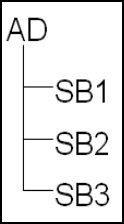
For example, an AD is issued that contains certain Task Cards. At the same time, there are three SBs that, together, include the same Task Cards. If the SBs are accomplished, the AD has also been accomplished and does not need to be planned and accomplished again.
Once the three SBs are performed and terminated, the AD can automatically be terminated as well. Please note that the order in which the SBs are performed does not matter.
Note: Any E/C that is entered as the 'terminating' E/C must be known to the system.
The above example will be reflected, as follows.
To create this function, the E/C that is to be terminated after the performance of one or several other E/Cs is called up in Engineering Control. On the Schedule Control Tab, enter the E/Cs whose compliance will automatically terminate the original E/C. The user must select the 'Terminated if E/C Terminated' option from the drop-down menu and enter the E/C that will terminate the original E/C. Only after all E/Cs that are entered in this Schedule Control window as “Terminated E/C if Terminated' are performed and terminated will the original E/C will also be terminated.
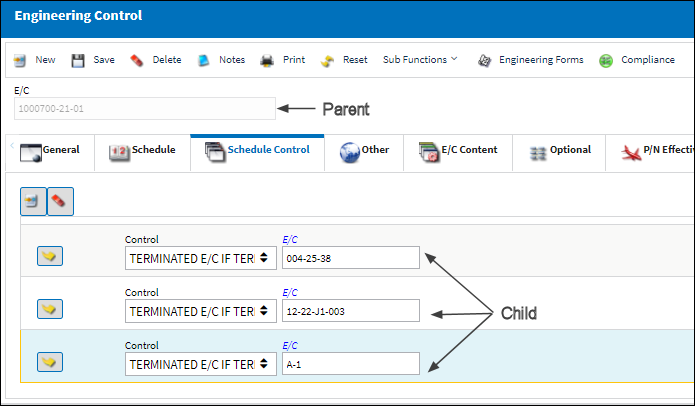
Note: The user has the option to select the New  button to add as many additional E/Cs as required
In the Compliance function, a record will be created for the termination of the original E/C with information about the W/O number and E/C which brought about the terminating action.
Download Online Help
Print
|
©1997-2018 Trax USA Corp. All rights reserved. This manual may not be copied, photocopied, reproduced, translated, or converted to any electronic or machine-readable form, in whole or in part, without prior written approval from Trax USA Corp. |
 |