 Download Online Help
 Print
|
|
|
|
|


The E/C To Be Terminated option allows the user to configure the system to terminate a specific E/C once the first compliance record is written for the Parent E/C. The compliance record is written for the original E/C when the Work Order is closed.
Note: An A/C E/C cannot activate or terminate a P/N E/C.
When the status of the E/C is Open, or Applicable/ Not Embody, and compliance is manually written, the functionality of termination will still occur.
Note: The Child/ Dependent E/Cs interval should always match the interval of the Parent E/Cs schedule. For example, if the Parent E/C is scheduled by 500 hours or 185 days, then the Child/ Dependent E/Cs schedule should match. Additionally, we recommend that the Plan E/C checkbox, via the Engineering Control, Schedule tab remains selected for the Child/ Dependent E/C to allow for Planning to observe the E/C.
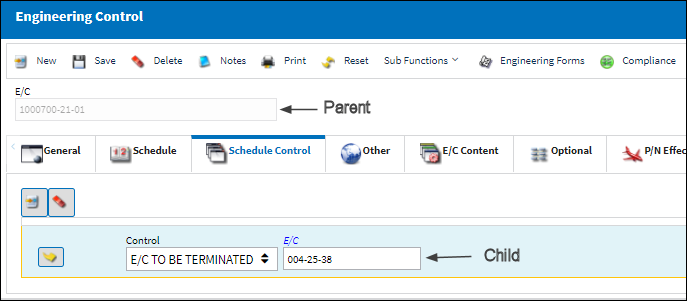
Only the tail number specified in the Original E/C compliance record will be affected by (i.e. terminated) the E/C To Be Terminated.
By default, E/Cs are terminated once the number that is specified in the Repeat Number field of the Schedule tab is met.
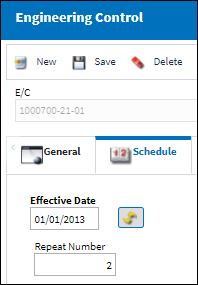
The E/C To Be Terminated functionality in the E/C Schedule Control Tab overrides the default method or defined repeat occurrences.
Note: The user may utilize the E/C To Be Terminated option with an unlimited number of E/Cs.
Download Online Help
Print
|
©1997-2018 Trax USA Corp. All rights reserved. This manual may not be copied, photocopied, reproduced, translated, or converted to any electronic or machine-readable form, in whole or in part, without prior written approval from Trax USA Corp. |
 |